
The annual IEP review runs on a clock no one mentions beforehand. The team walks in with testing data, service logs, and progress notes already printed. You walk in with whatever you remember from the last year, and your nerves.
That asymmetry comes from how rarely the law actually requires this exact conversation. IDEA requires a school to review a child's IEP periodically, but not less than annually, to decide whether the annual goals are being met and whether the plan needs to change (20 U.S.C. § 1414(d)(4)(A)(i), via Cornell Law School's Legal Information Institute). Once a year, by law, somebody is supposed to ask whether this is working. Walking in with an answer better than "it feels like it" is the job in front of you.
Getting the materials you need ahead of that question is its own fight. A 2026 survey of 342 families across nearly 40 Los Angeles County school districts found that only 25% of respondents received the materials they needed before an IEP meeting, with Spanish-speaking households four times less likely to get them (SpEducational survey, via The 74). That survey measured what schools send parents, not what parents bring with them, but the lesson travels in both directions: if you're waiting on someone else to hand you the paperwork that makes your case, you may be waiting a long time. Build your own copy instead.
For us, this started with a log nobody asked for. When something went wrong (a fever, a choking episode, a refusal), the only way to give his GI or his pediatrician something they could act on was to have already been keeping a log reaching back a week, kept before anyone told me to. An IEP team works the same way. Ninety days of what actually happened is a stronger argument than a year of memory, however good that memory is.
That's what a Care Report is for. It isn't a new thing to track: it's a way of handing over what you were already tracking, shaped to fit whatever room you're walking into next.
Choose the window, then build it in CareHaven
CareHaven's Care Report turns weeks of logging into one PDF, built on your device the moment you tap generate: nothing leaves your phone to make it happen (CareHaven help: Generate a Care Report (PDF)). The path, start to finish:
- Tap Main Menu → Caregiver.
- Tap the Reflect (Recap + Wins) row. This opens the Weekly Recap screen.
- In the top-right of the toolbar, tap the document icon (its accessibility label is "Care report PDF"). The Care Report sheet opens.
- Choose your date range. It opens set to the past month by default. Tap Last 90 days for an annual review: that stretch usually covers the time since your last check-in, and it's long enough to show a pattern instead of one unusually good or bad week. Both days you pick print at the top of the PDF, start to end.
- Pick your sections. Every section starts on; turn off anything you don't want in this particular room.
- Tap Generate PDF. You'll feel a small confirmation when it's ready.
- Tap Share, then email it, AirDrop it, save it to Files, or send it to a printer.
That's the whole flow. No retyping notes from a paper calendar, no scrolling six weeks back through text messages to find the date something happened.
What actually goes in the room
The two sections worth lingering on for an IEP review are Goals and Milestones, because they're the two a school team almost never sees without you bringing them.
-
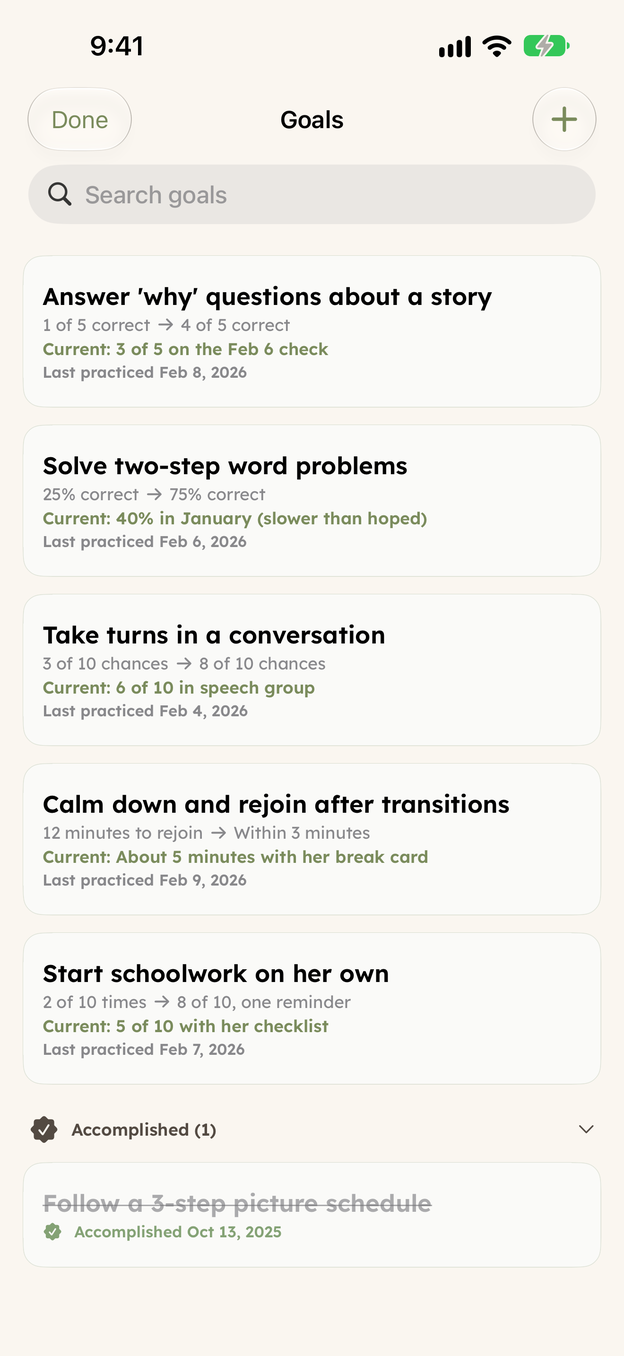
Each goal keeps its baseline and target, so the report can show movement instead of a guess. -
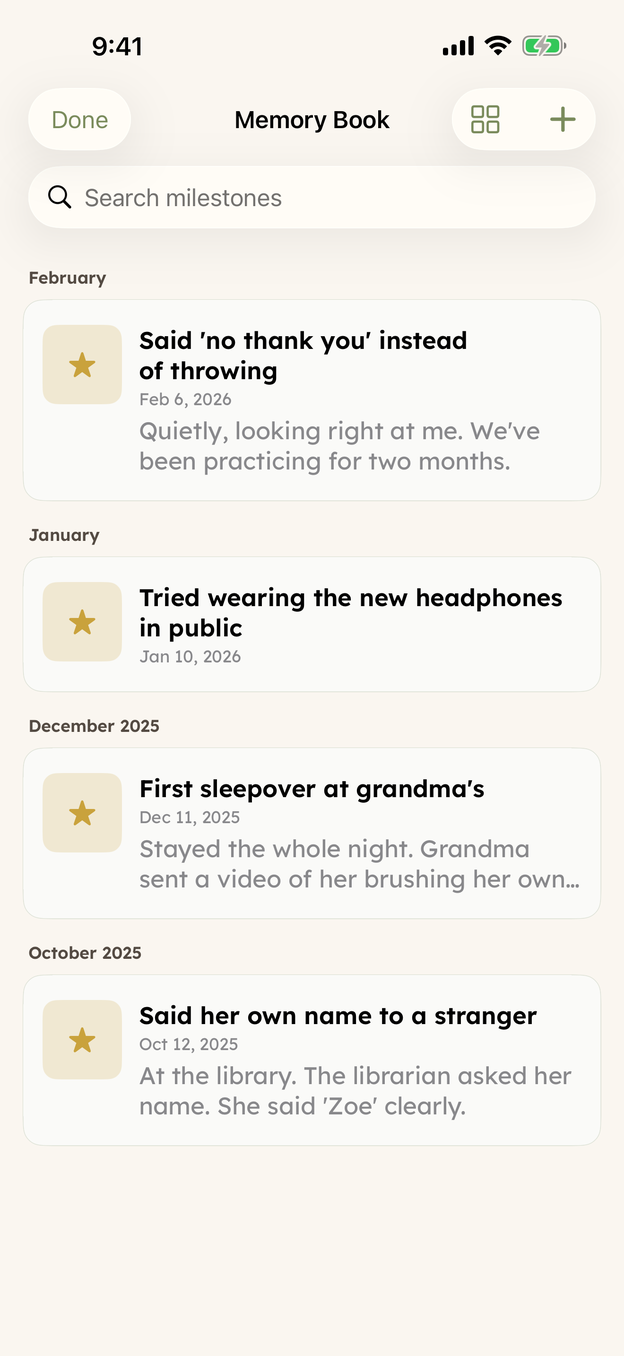
Milestones hold the wins with their own dates, so the report can show them instead of your memory of them.
Open Main Menu → Care Plan → Goals any time between meetings and log a practice session: current progress in plain words ("3 of 5 correct on the Feb 6 check"), plus a short note. Each goal then carries its own history: where it started, where it stands now, and when it was last worked on. When the Goals section is on in your report, that whole trail travels with it instead of you trying to summarize a year of practice from memory in the meeting itself.
Milestones work differently. They're the wins, not the targets: a short title, a date, and as much of the story as you want to write. A moment that looked small to everyone else in the room gets to keep its weight here. When the Milestones section is on, those entries print with their dates attached, which is exactly the kind of detail an IEP team doesn't otherwise have: it didn't happen on their clock. It happened at a library counter, or a grandparent's kitchen, on an ordinary Tuesday.
Match the sections to the room
The report can include seven sections in total: Activity summary, Behaviors, Seizures, Medications, Goals, Milestones, and Doctor visits. You don't owe every room all of it. For an IEP meeting, you might keep Goals, Milestones, and Behaviors on; for a doctor, lean on Medications, Seizures, and Doctor visits instead: same report, different room, a few taps apart.
If a section you turned on has nothing logged for your dates, the report says so in plain words instead of printing a blank header ("Nothing logged this period: Seizures, Milestones"), so an empty section never reads as one you hid.
What stays out, on purpose
Your notes, diary entries, and photos never go into the report, no matter which sections you turn on. A diary is for you, not for a meeting, and the footer on every page says so plainly. If one specific observation from your own writing belongs in the room, you choose to share that line yourself, separately. The report itself won't carry it for you.
Send it, print it, or just hand over the phone
Once it's generated, tap Share and the standard iOS sheet opens: email it ahead of the meeting, AirDrop it to your own laptop to print at home, save it to Files, or print it directly if there's a printer nearby. Emailing it to yourself the night before means you walk in with it already on your phone, in case the copy you printed stays on the kitchen counter (it happens more than anyone admits). There's nothing to clean up afterward, either; generate a fresh one before the next meeting and this one stays exactly where you saved it.
A ninety-day PDF won't win an argument the school team has already decided to have. But it changes what a disagreement sounds like in the room. "We feel he's doing better" against a dated goal log and a dozen recorded wins since the last review is not a fair fight, and it shouldn't be. You did the work of noticing all year. The report just makes sure the room can see it too.
CareHaven is in open beta
Everything above is in the app. It is free while in beta, all your care data stays on your device, and you can walk away with a full backup at any time.
Join the iPhone beta →