Your iPhone can't run CareHaven yet. CareHaven for iPhone requires iOS 17 (iPhone 11 or newer, released September 2019). We'll let you know the moment CareHaven can run on your device. Get notified →
CareHaven is now in beta on iPhone — install in ~60 seconds. Join the beta →
CareHaven · private apps for family caregivers

The mental load is real.
We build the apps that carry it.

You're already managing the medical and behavioral care of someone you love — most of it from the kitchen counter, most of it from memory. We build a family of private iPhone apps that take that weight off you, one piece at a time. Start with CareHaven, our care app: every dose, every meltdown, every win, every appointment, in one quiet place. So your brain doesn't have to hold it.

Install CareHaven on your iPhone in about 60 seconds via TestFlight — free, made by Apple. Not ready to install? Grab the one-page Handoff Sheet PDF and we'll let you know when the app's ready for you. See all three apps we're building →

🔒 Private — encrypted end-to-end 📱 Native iPhone & iPad 🚀 CareHaven is in beta
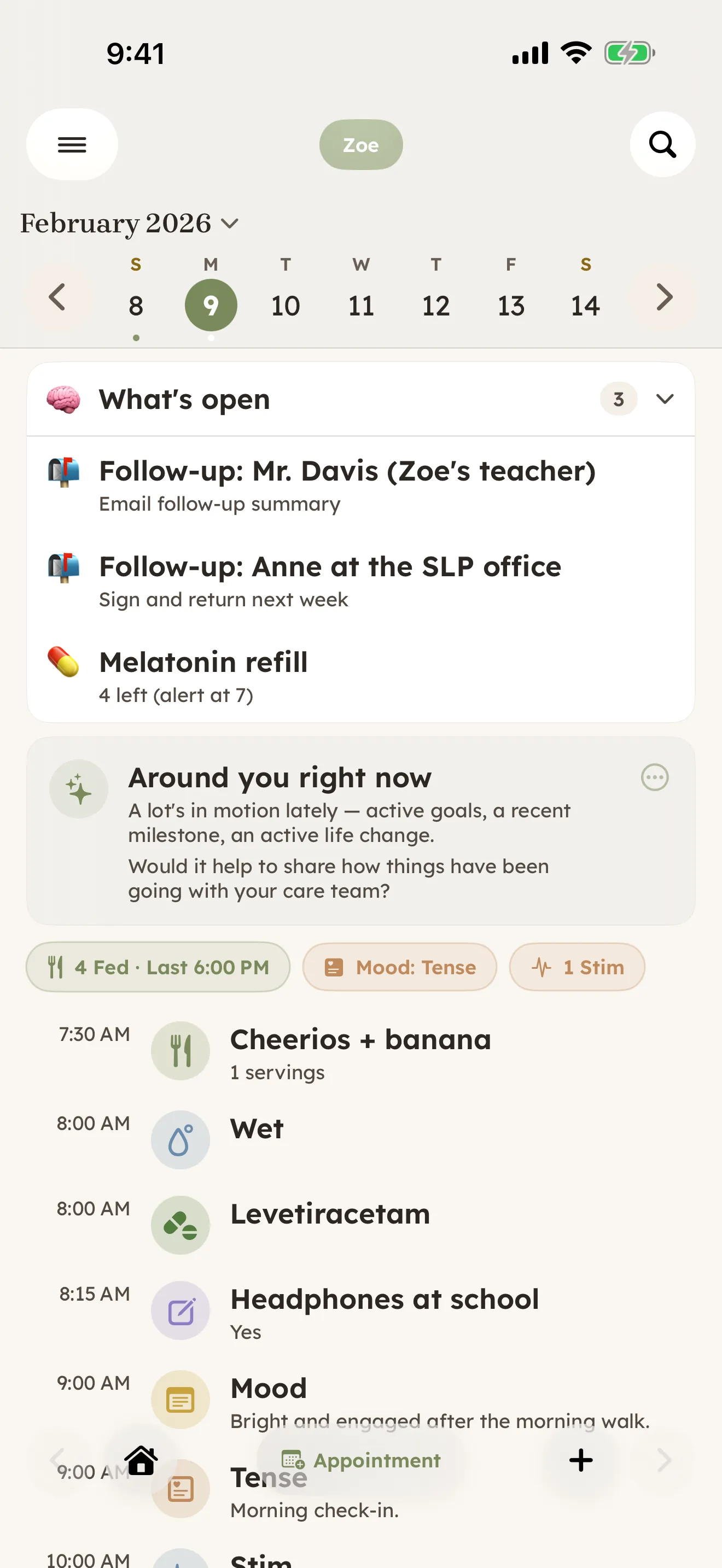
CareHaven Home — a day timeline showing feedings, behaviors, vitals, and notes, with summary pills at the top.
Built by CareHaven

Three apps. One mental load.

Caring for someone with complex needs isn't one job — it's a daily record, a fight with the school, and a kid who's trying to grow up in the middle of it. We're building an app for each, and each one stands on its own. CareHaven, the one you can use today, is private by default: no ads, and we don't sell your care data. The other two are still being built, and we'll tell you exactly how they handle your data before we ask you to trust them with any.

CareHaven

In beta

The daily care record.

Medications, seizures, appointments, behaviors, patterns, and caregiver handoffs — held in one calm place instead of your memory. Free on iPhone and iPad while it's in beta.

Groundwork

In development

The IEP advocacy cockpit.

Store the IEP or 504 plan, understand what it actually promises, walk into every meeting prepared, and hold the school to the plan as written. Not yet available to install — and "Groundwork" is a working title we may still change.

In development — we'll announce here when there's something to try.

ChoreLight

In development

Chores that build independence.

A parent assigns the household chores; the child works through them one step at a time, in an interface built for their age and how much support they need. Not yet available to install, and no release date announced.

In development — we'll announce here when there's something to try.

CareHaven LLC is an independent, founder-owned company — not a nonprofit or a registered charity. It's built by a caregiver, initially to help with his own family's care load. The apps carry no advertising and no advertising trackers, and we don't sell your care data.

Why we're building this

An app should carry the load. Not add to it.

Most apps make caregivers do the work twice — once with the kid, then again with their thumbs. CareHaven is built around four lifts that nothing else handles well.

The remembering

"What did the neurologist say about adjusting the dose? When was the last seizure? What did Joey eat at school?"

The app holds it. Every entry is one tap away from being logged with timestamp, context, and a record you can hand to anyone who needs it. No more parent-as-database.

The pattern-spotting

"Are spirals worse on Wednesdays? Does poor sleep predict tomorrow's hard day? Is texture the thread in the food refusals?"

The app reads the patterns. Local, deterministic trend detection runs over your log nightly — surfacing what's worth noticing. No AI guessing, just math on what you logged.

The handoff

"How do I brief the new sitter, the new SLP, the substitute teacher, my own mother?"

The app prepares it. Tap "Handoff" — the app drafts a one-page summary of today, the cues only experienced caregivers know, and the emergency plan. Print, AirDrop, or NameDrop in seconds.

The doctor visit

"I had three things I wanted to ask and now I can't remember any of them."

The app prepares your case. Pre-visit prompts pull the last 30 days into a clinician-ready summary. During the visit, optional on-device transcription captures every follow-up so nothing leaves the room unrecorded.

Inside the app

Built for the way care actually happens.

Every surface earns its keep. No chat thread of unread messages, no infinite settings, no tabs you forget exist. Just the surfaces a caregiver actually opens.

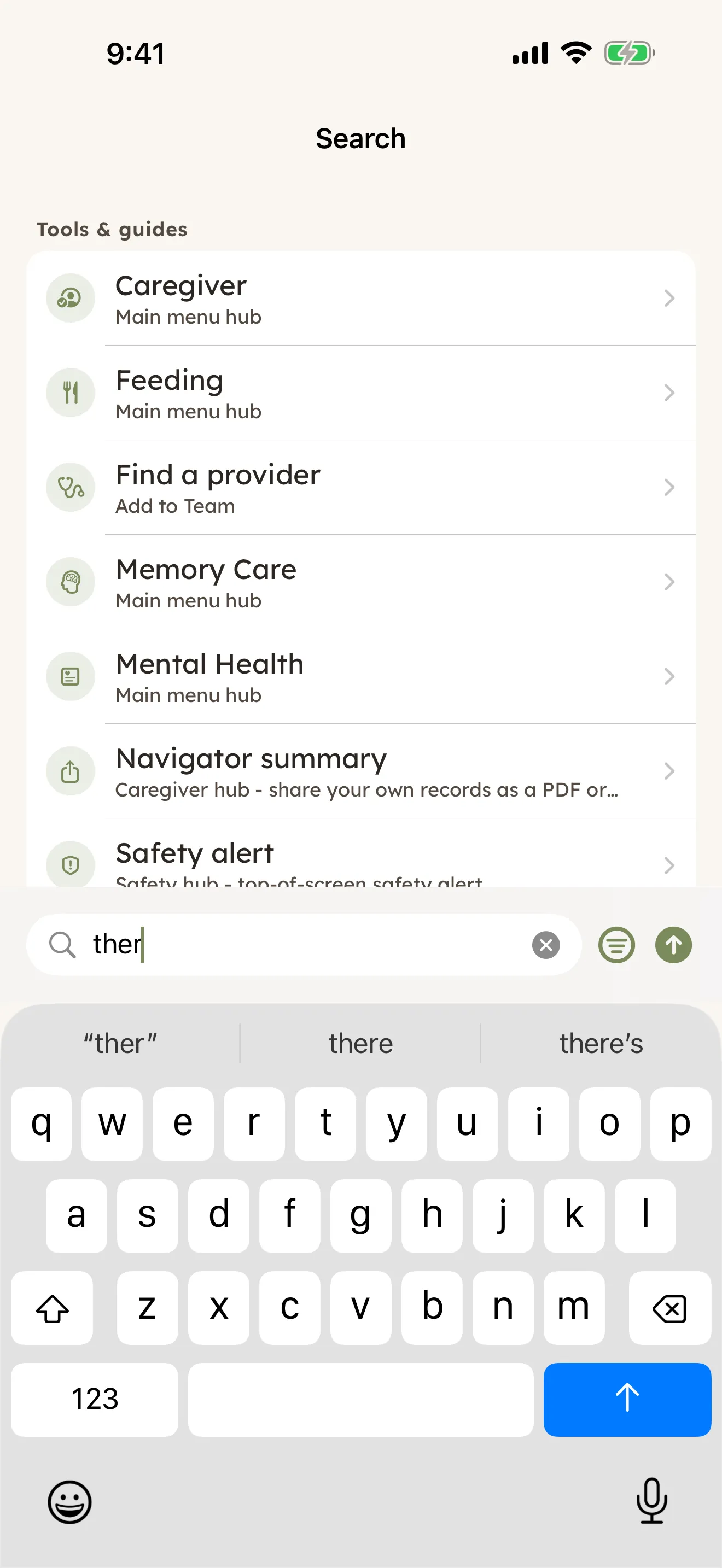
Universal search — type one letter, find everything

Universal Search

Type one letter, see every match — surfaces, cues, contacts, milestones, medications, the lot. Local and instant. The AI assistant is one tap away when you want it, but typing alone never sends a thing off the device.

Home — day timeline

Day Timeline

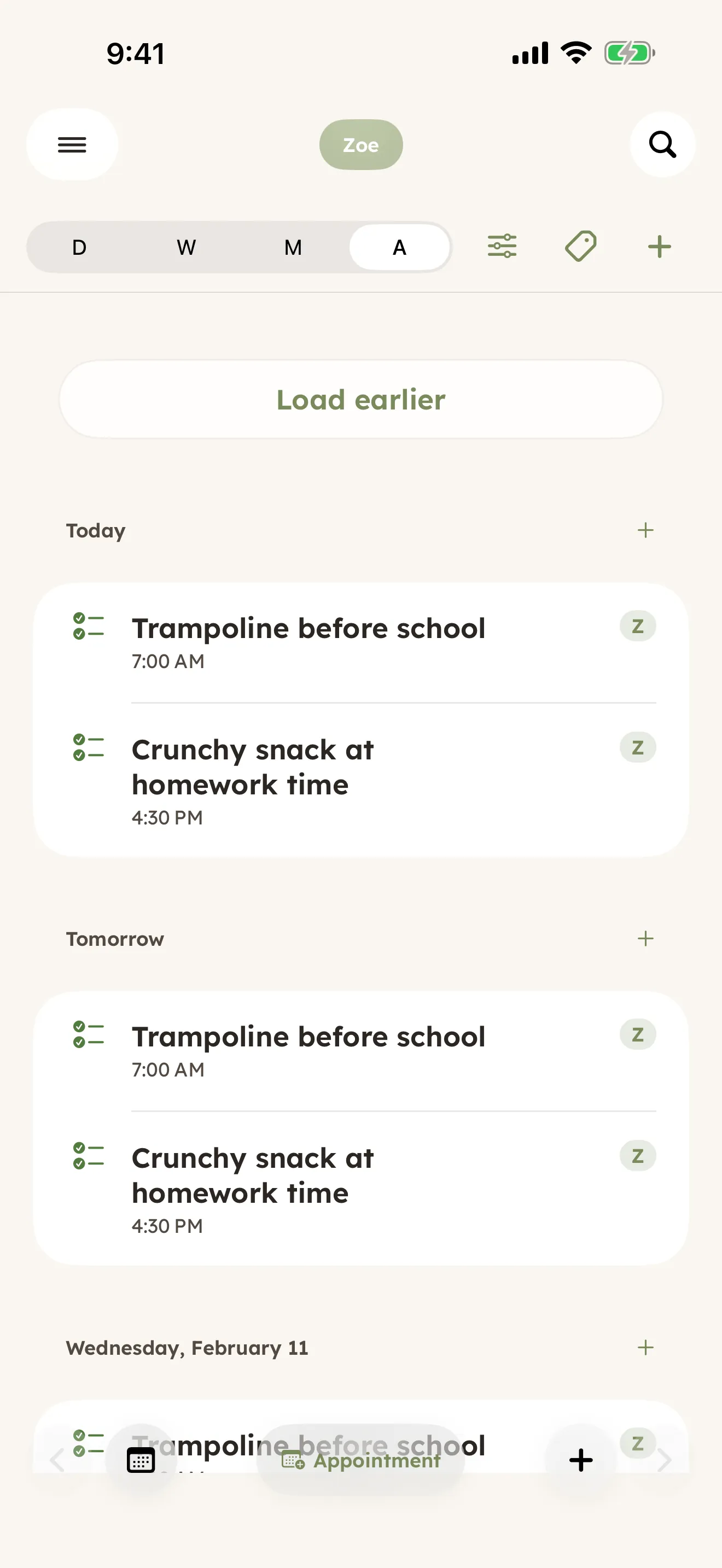
The home screen. One scroll = one day. Feedings, sleep, behaviors, vitals, doctor visits, wins, and notes — chronological, with at-a-glance summary pills and a "What's open" digest at the top.

Schedule — appointments

Schedule

Therapy sessions, school meetings, medical visits. Recurring or one-time. Bucketed Today / Upcoming / Later / Past so the most pressing things stay at the top, with day-of nudges for what needs to leave the house.

Patterns — trend insights

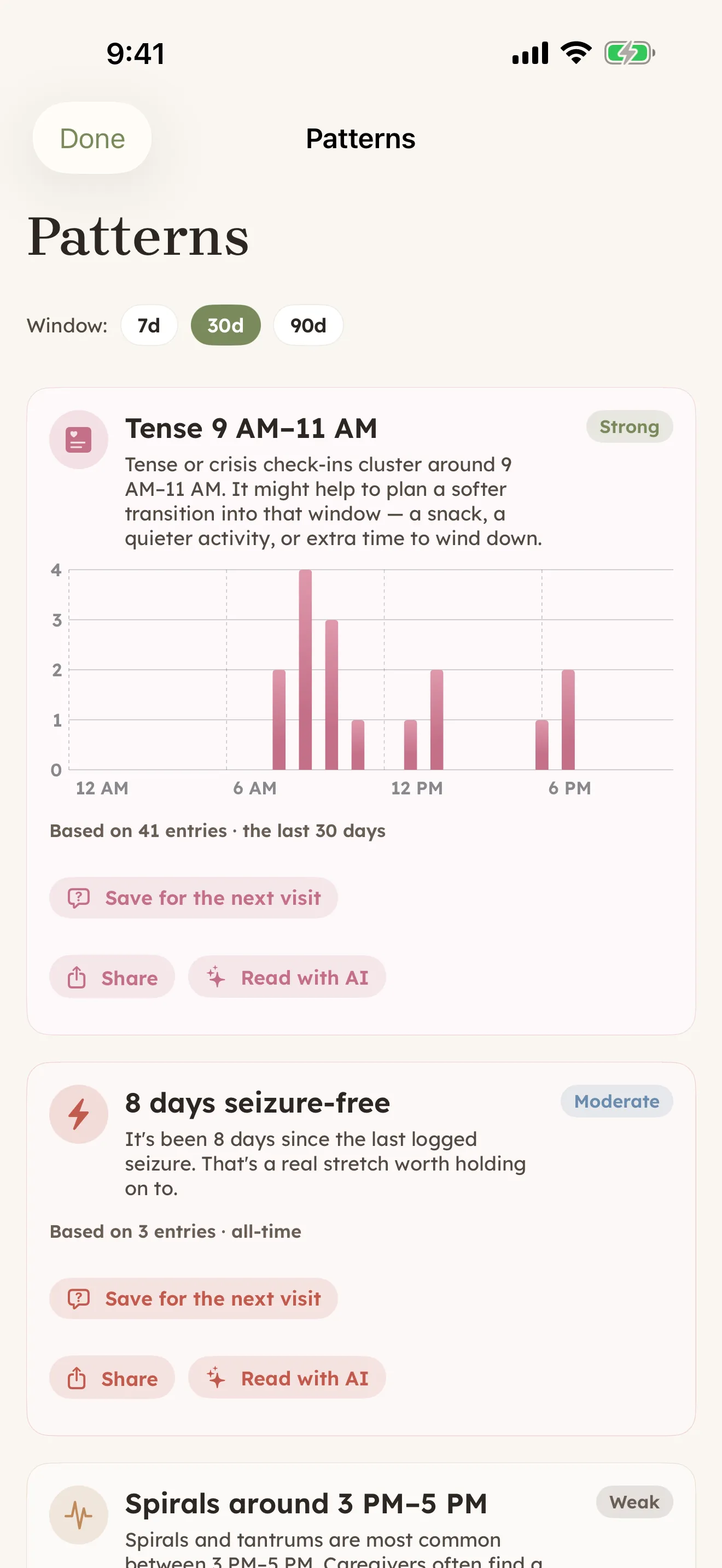
Patterns

Deterministic trend detection over your own log. Mood by hour, sleep ↔ next-day behavior, day-of-week peaks, food sensory threads, seizure-free streaks. Honest about confidence — weak signals show as weak.

Cue Guide — what the signals mean

Cue Guide

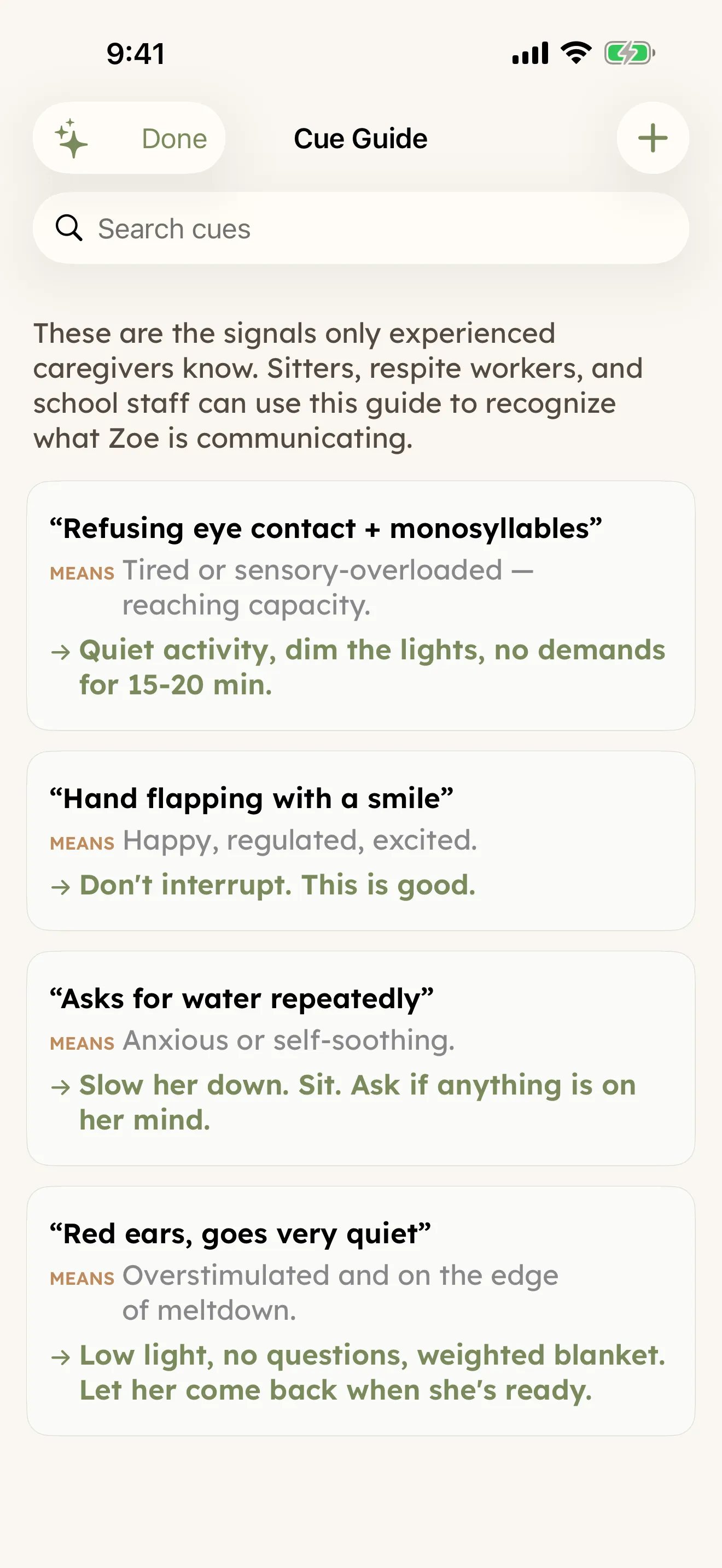
The signals only experienced caregivers know. "Asks for water repeatedly = anxious." "Red ears, very quiet = overstimulated." Sitters, respite workers, and school staff actually understand what they're seeing.

Sensory Profile — 8-channel map

Sensory Profile

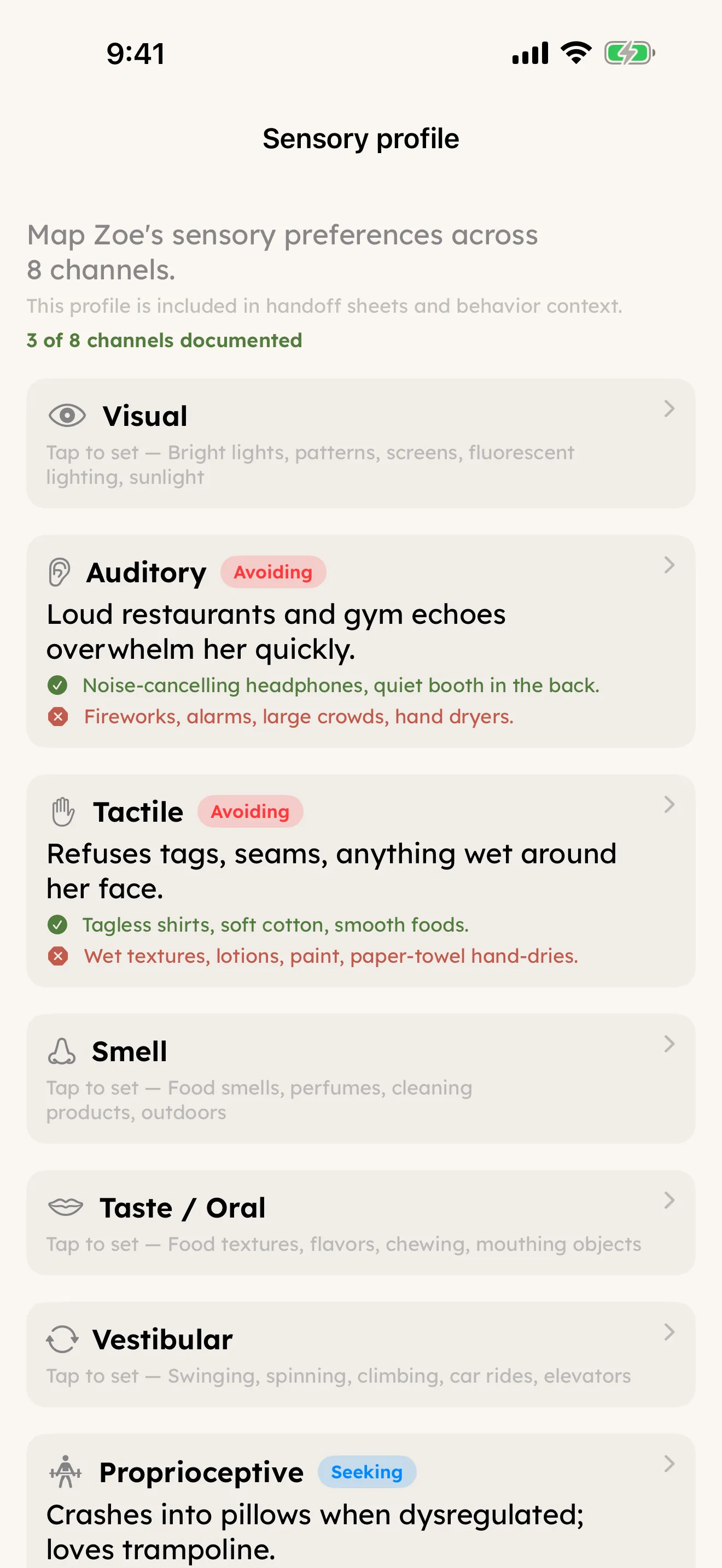
Eight channels mapped per person — auditory, tactile, smell, proprioceptive, vestibular, and the rest — with what calms, what overwhelms, and which tendency (avoiding, seeking, mixed). Travels into the handoff sheet automatically so a sitter walks in with the map.

Memory Book — milestones

Memory Book

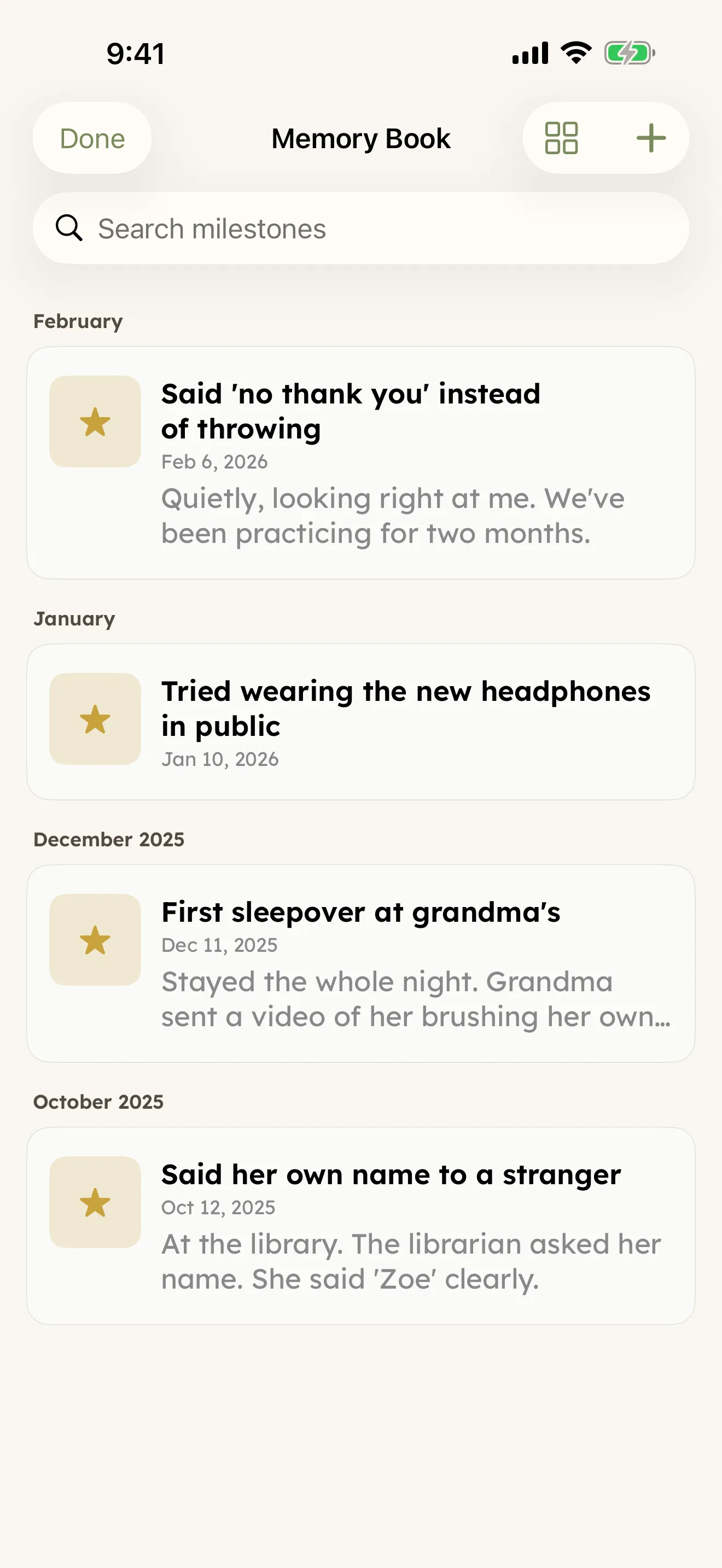
Wins, firsts, and breakthroughs — kept where the hard days are kept too. Caregivers tend to underestimate how much progress has happened. Memory Book is the antidote.

Handoff — sitter brief

Handoff

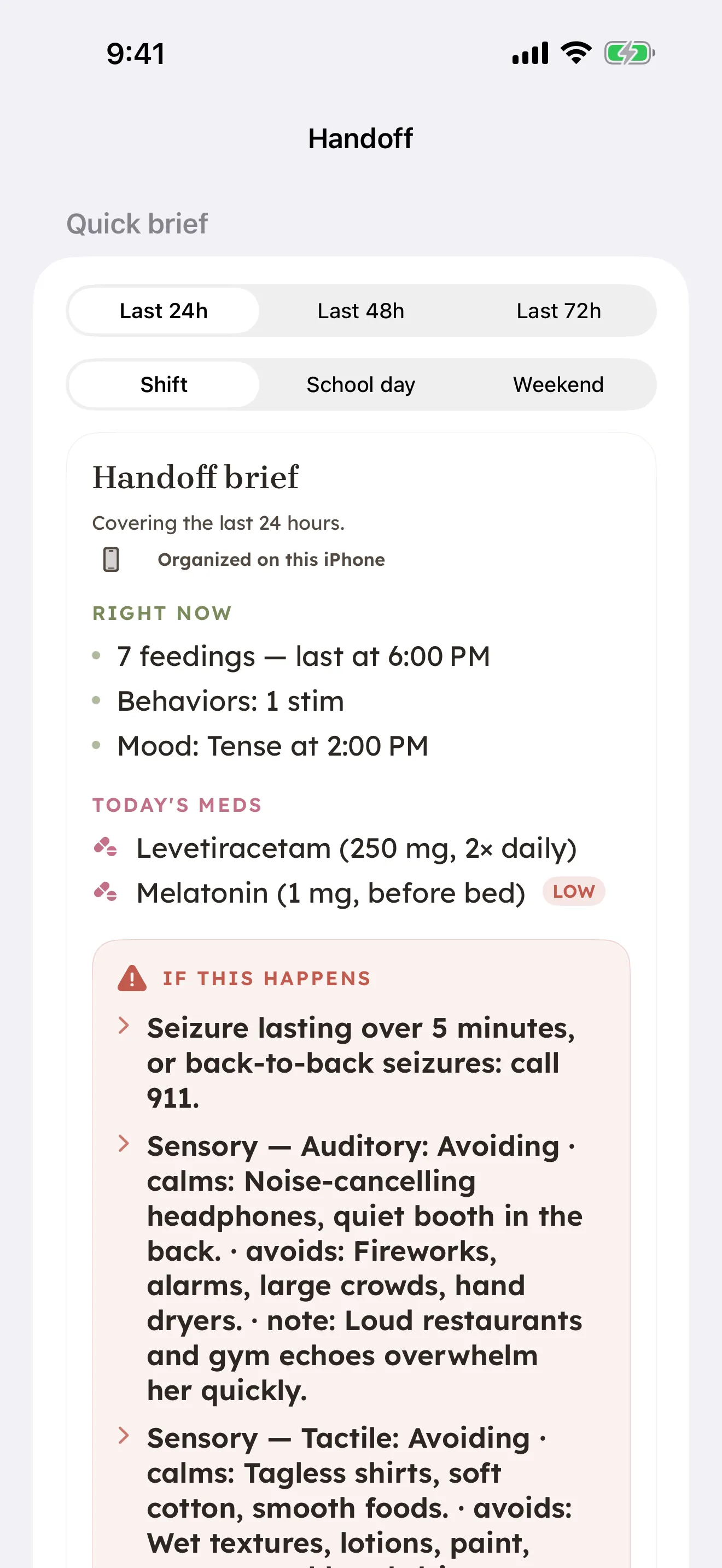
One tap, one page. Today's plan, current cues, active life changes, emergency contacts and meds. AirDrop, NameDrop, print, or PDF. The signature moment of the app.

Privacy lock — four-digit PIN protects the app and sensitive surfaces

Privacy Lock

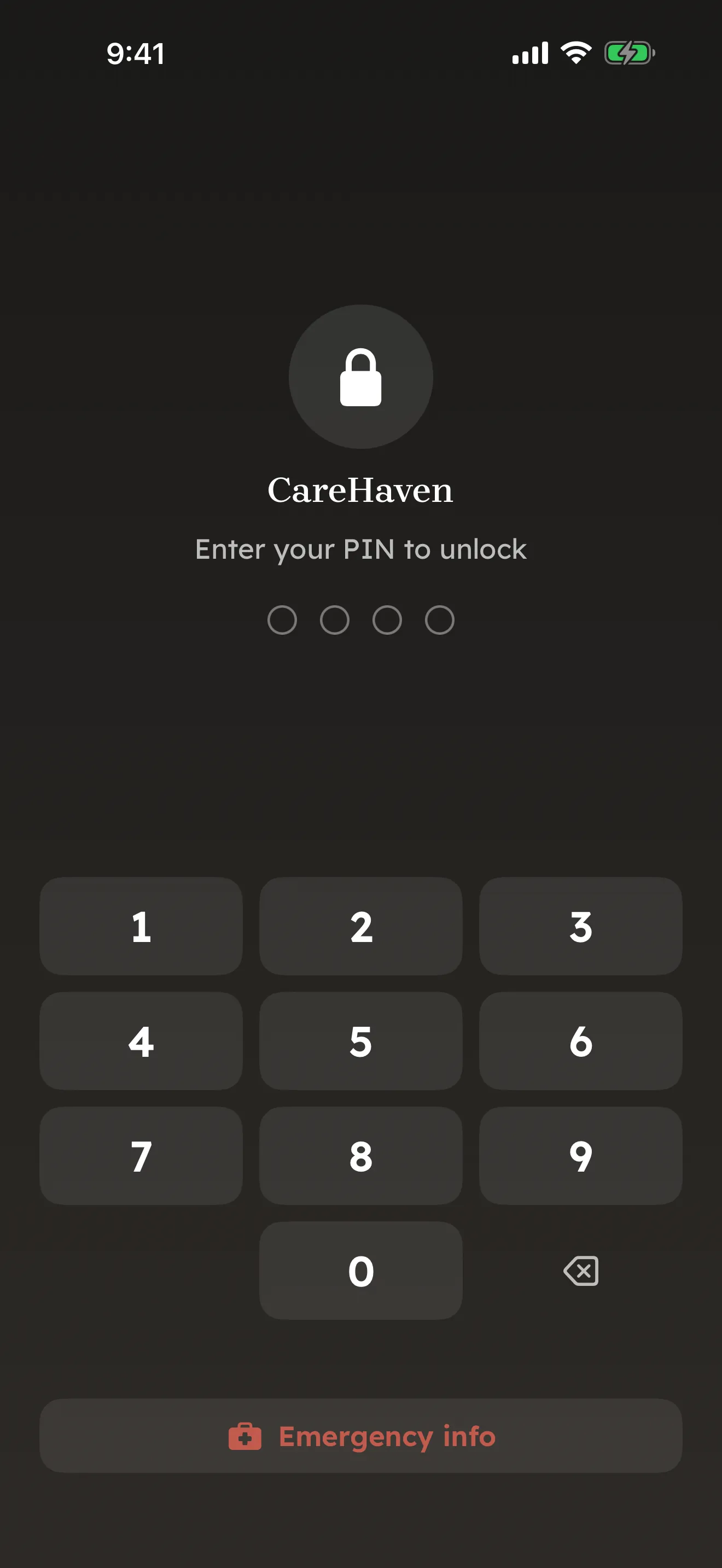
Optional four-digit PIN protects the whole app — and any sensitive surface inside it — when a sitter, family member, or clinician borrows the phone. Face ID or Touch ID for the primary caregiver. Auto-locks after the timeout you set, so a hand-off across the kitchen counter doesn't expose a year of medical history.

More than a tracker

The work no other care app does for you.

Logging the day is table stakes. CareHaven goes further — across the whole household, across every caregiver, with the clinical references and safety checks built in.

Care Circle

Everyone on the same page, in real time.

"Mom logs at the doctor's. Dad's phone updates at home."

Share a person with the other parent, a grandparent, a sitter — each with the right level of access. Read-only for the babysitter. Full co-owner for the other parent. Time-boxed for the grandparent visiting this month. Changes sync within seconds, and the admin can revoke anyone, anytime. Each co-caregiver gets their own private, encrypted access to just the person you're sharing — encrypted the whole way, so only your circle can read it.

From a 4-year-old to an aging parent

One app across the whole household.

Care is organized by domain — feeding, medical, body care, safety, mental health, memory & dementia, insurance — and each one auto-tunes to the person it's for. A toddler's profile surfaces milestones and sensory needs; an elder's surfaces fall risk, comfort care, and orientation cues. The same calm interface, shaped to whoever you're caring for.

Built-in references

The clinical knowledge, in plain language.

Bundled and offline: CDC developmental milestones, a medication library (RxNorm), diet-texture levels (IDDSI), diagnosis explanations (ICD-10 / DSM-5 in caregiver words), AAC vocabulary, and crisis lines. Look up what a term means, what a milestone is, or which textures are safe — without a signal, without leaving the app, without a search engine's worth of noise.

Medication safety

It gives you the question to ask.

"Wait — should I be asking about those two together?"

Add a medication and CareHaven flags well-known cautions between common drug classes — the ones that come up most in ADHD, autism, epilepsy, mental health, and elder care — drawn from FDA labeling and public clinical references. It doesn't diagnose interactions, and it won't catch everything: it hands you a specific, informed question for the prescriber or pharmacist, which is the one thing caregivers say they never have in the room. On-device, no account, no data sent anywhere.

Profile hub

Every per-person setting in one place.

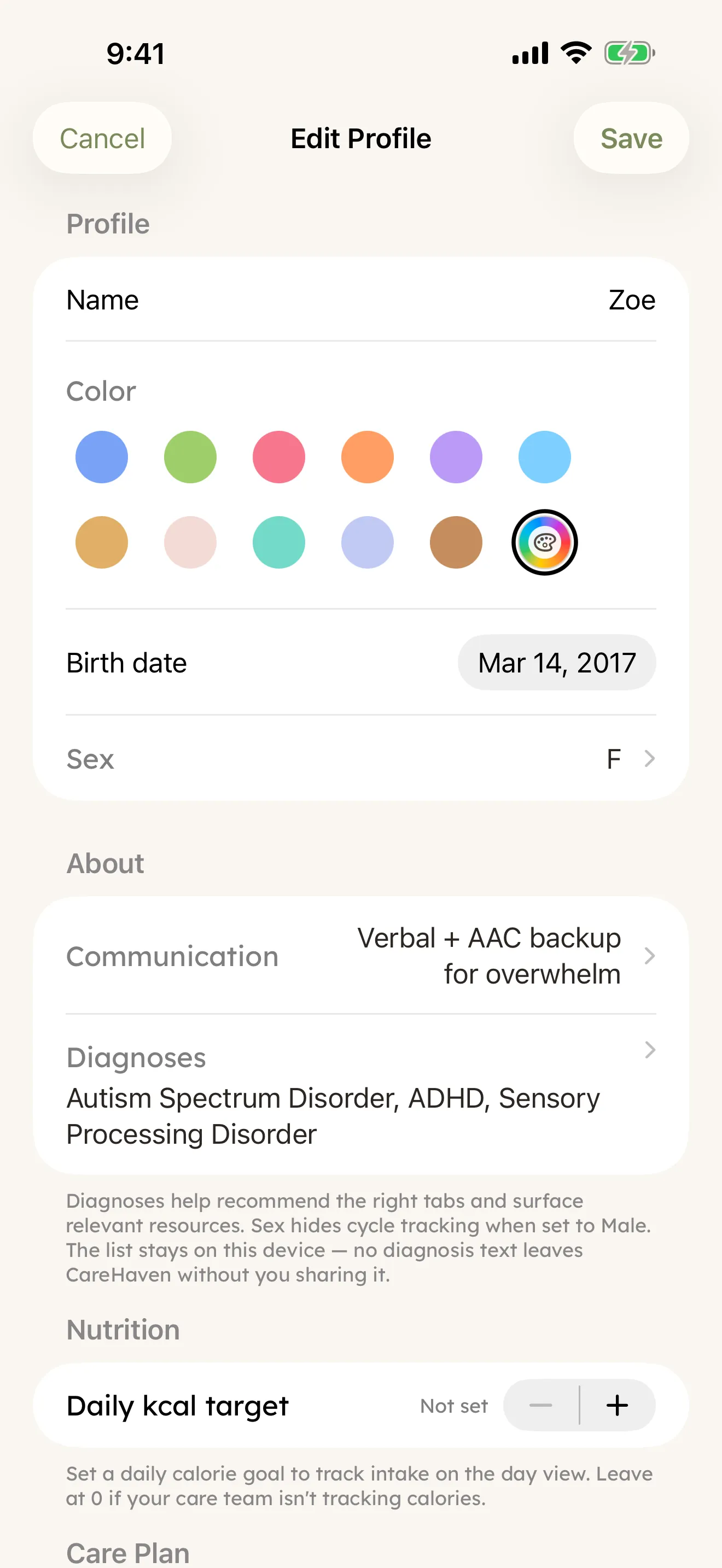
Tap the profile pill at the top of the screen — or long-press anyone in the switcher — to open a card that holds the whole person. Profile basics (name, color, diagnoses), Care plan (goals, milestones, cues), Daily life (routines, preferred foods, life changes, sensory profile), Health & communication (medications, appointments, AAC phrases). Every section reads from and writes back to the same data the rest of the app uses — change once, change everywhere.

Profile hub — care plan, daily life, health, communication
Goals & IEP

The advocacy work, made visible.

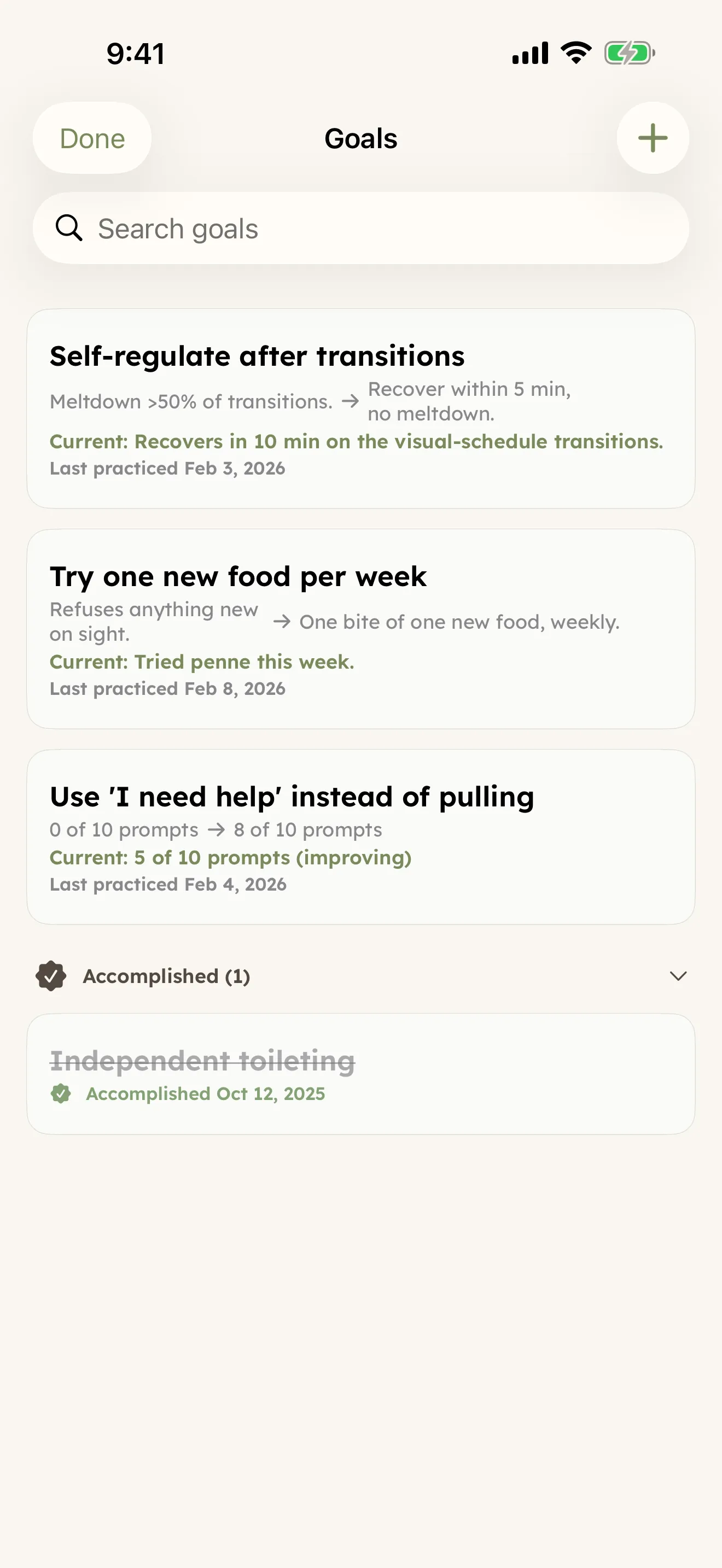
Every IEP goal. Every therapy target. Practice logged in real time, baseline → target tracked across months, accomplishments archived with the date they happened. When the next IEP meeting starts, you walk in with proof.

Goals — IEP tracking
Care for the caregiver, too

The mental load is real. The app helps carry it.

Most care apps treat the caregiver as the data-entry layer. CareHaven treats them as a person who is also exhausted, and quietly carries some of the weight back.

What's open

The mental load digest.

"Nothing needs you right now."

A small, calm card on home that pulls together the open loops — appointments today and tomorrow, low-supply meds, follow-ups you haven't closed. When the list is empty, it says so. That moment of green is real. The card exists for it.

Self-recognition

"What I did today."

"You showed up today. That counts."

Inside the wellbeing surface, a quiet count of every care moment you delivered today — feedings, sleep tracked, behaviors logged, notes written, check-ins. So a caregiver who feels like they "didn't do anything" can see what the truth actually was.

When you can't get going

"I'm stuck."

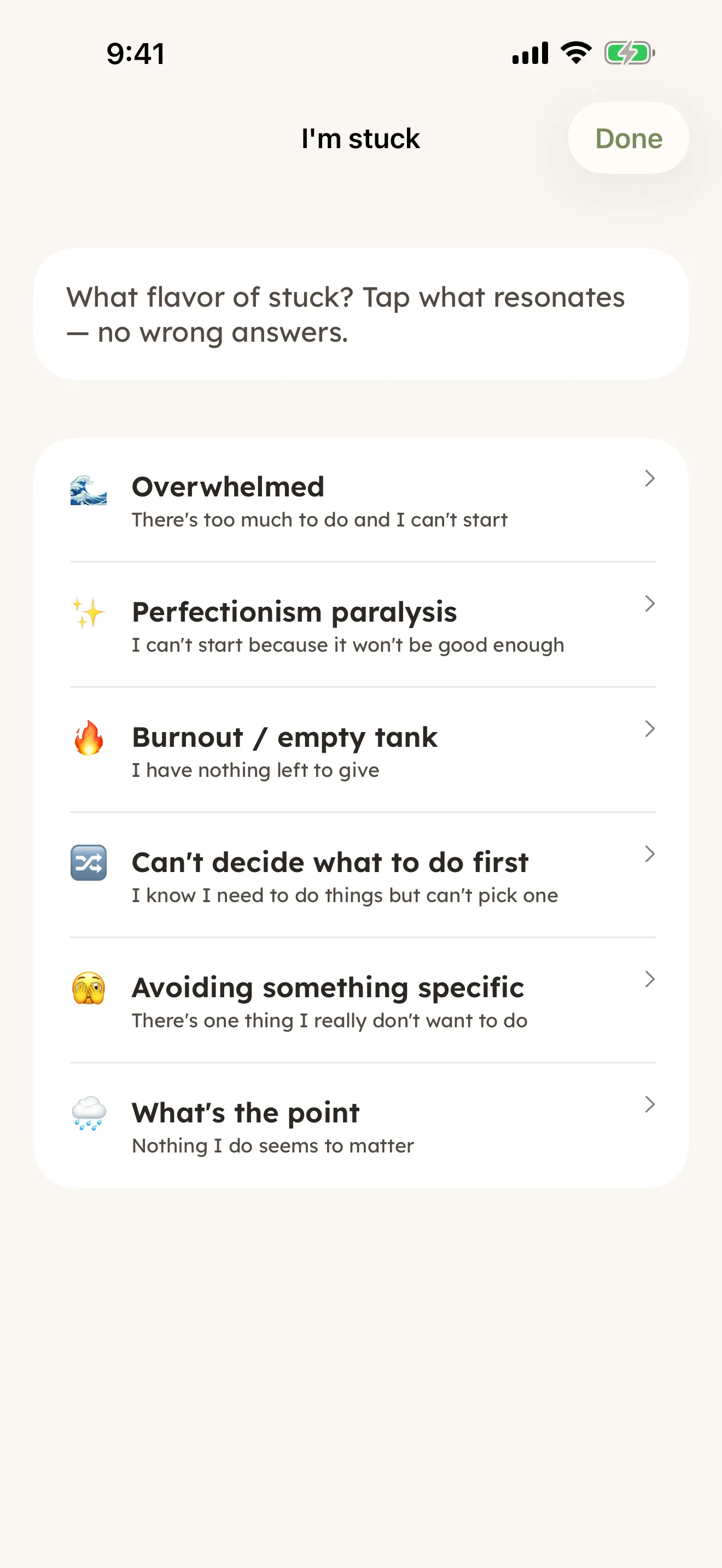
Six flavors of stuck — overwhelmed, perfectionism, burnout, can't decide, avoiding, hopeless — each with four or five concrete things to try. Anti-Planner-inspired. No logging, no analysis, no nag. Pick the one that resonates, take what helps, leave the rest.

I'm stuck — six flavors of stuck (overwhelmed, perfectionism paralysis, burnout, can't decide, avoiding, what's the point), each with a colored icon and short subtitle
Calm tools

For the moment that's actually happening.

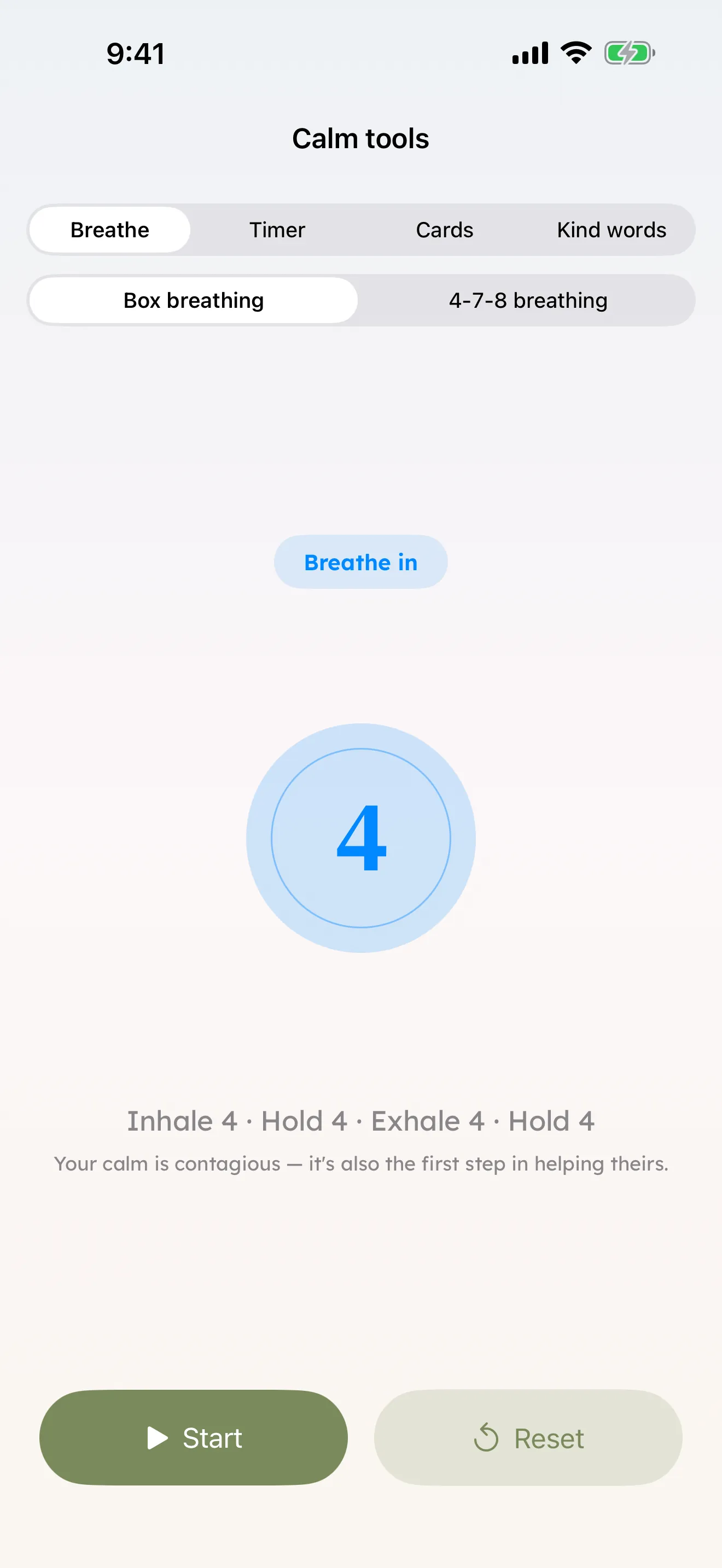
Three tools, one segmented control: a breathing orb that scales with inhale and exhale (box or 4-7-8), a clean countdown timer, and a 5-4-3-2-1 grounding deck. Calmer chrome, soft animation, no analytics. Built for in-crisis use — caregivers, and the people they care for.

Calm Tools — breathing orb
Doctor visits

One tap drops 30 days of care into the visit summary.

Auto-fill pulls a deterministic recap of the last 30 days — feedings, sleep quality and wakings, seizures by type, behaviors by kind, most-recent vitals, active medications, and the life-context that's currently on. Edit before you save. Show up at the appointment with the recap already drafted instead of typing it from scratch.

In the appointment

Record the visit — pause, resume, replay later.

Hit record at the start. Live transcription appears as the doctor speaks, on-device, never sent to a server. Step out for a private side conversation, hit pause; resume when you're back and the transcript picks up with a timestamp marker so you can find that moment. The audio file saves alongside the visit — replay it later when you can't remember what dose the doctor said.

Try before you commit

Eighteen demo profiles, each shaped like a real care life.

Settings → Demo loads a fictional caregiver journal alongside your own — eighteen to choose from, all fully populated. A newborn with night feeds, a four-year-old with Down syndrome learning to sign, an AAC user with cerebral palsy, a profoundly deaf child whose primary language is ASL, a child with PKU on a metabolic clinic schedule, a Type 1 diabetes teen with autism, a young adult transitioning out of pediatric services, an elder with Alzheimer's on comfort care. Load one, see how the surfaces respond to a profile shaped like yours. Remove them all in one tap when you're done exploring.

Caregiver in the chart

Your sleep, alongside theirs.

"You're in the same dataset."

Optional Apple Health integration writes the caregiver's own sleep, heart rate, and mindful minutes into a separate lane in Patterns. The app stops pretending you're invisible — run low on sleep three nights in a row, and the chart shows it next to the seizure-free streak it might explain. Stays on the caregiver's phone, never shared with the rest of the household.

Across every Apple surface

The app meets you where the day is.

Care happens on the kitchen counter, in the car, at 3 a.m. on the wrist, in the chair next to the SLP. CareHaven shows up on every Apple surface in a way that fits that moment — not the same screen forced into a smaller frame.

Apple Watch

One-tap logging from the wrist.

Feeding, potty, regulation check-in, behavior note, a quick win — each a single tap on the watch face. The entry lands on the phone before you're back at the counter. Built for the seconds between things, when reaching for the phone isn't an option.

StandBy widget

Bedside ambient mode.

Charge the iPhone on its side at night and StandBy renders a calm day-shape with the day's care moments, the active person's name, and the next appointment. Dim, glanceable, no notifications waking anyone up. The 3 a.m. medication question answered without unlocking the phone.

App Clip handoff

Brief a sitter without making them install anything.

Hold the iPhone near theirs — NameDrop transfers a one-time, time-boxed sitter brief through Apple's App Clip path. They see today's plan, current cues, emergency contacts, and active medications. The packet's expiry window is yours to set — a single shift, a school day, a weekend respite. No account, no download, no follow-up. The window closes when you say so.

Siri & Shortcuts

Hands-free logging when both hands are full.

"Hey Siri, log Maya a bottle." "What's next on Zoe's schedule?" Native App Intents wire every logging surface to Siri and the Shortcuts app, so a quick voice request hits the same data the app reads. Useful in the car, in a hospital chair, mid-feed.

Personal Voice

The AAC phrase library, in the care recipient's own voice.

iOS 17 added Personal Voice — anyone can record their own voice into the system, and apps with permission can speak as them. CareHaven's communication library hooks in: tap a phrase, hear it spoken in the voice the person chose for themselves. For families navigating a degenerative diagnosis, this surface preserves something precious. For everyone else, a more natural voice than the default robotic one.

Live Activities

A care session you're inside of, on the Lock Screen.

Start a feed, a calming routine, or a doctor visit and a Live Activity pins it to the Lock Screen + Dynamic Island. Glance at the elapsed time without unlocking; tap to end. The same pattern the system uses for timers and pizza deliveries, applied to the care moments that fill a day.

More than one way to see the day

Pick the surface that fits the moment.

The day timeline is the home. But some moments need a different shape — a fridge tablet, a fullscreen card to show a child what's coming, a list of the next seven days, a month grid. Same data, different lens.

Wall display

Kitchen-tablet ambient mode.

Big serif clock, the active person's day at a glance, the next 48 hours of appointments, a slowly cycling caregiver tip. Auto-dims after 30 seconds of stillness; tap to wake. Designed to live on a tablet on the counter so the whole household can see where the day is.

Person mode

Hand the iPhone to the kid.

One swipeable big-card view of today — one event per page, 110-point emoji, large serif title, optional time underneath. No log buttons, no edit chrome, no scrolling lists. A visual schedule the cared-for person can actually use to anticipate their own day.

Day · List · Month

Same data, three lenses.

Day timeline for today. List view for the next seven days at a glance — routines and appointments grouped by day. Month grid with event-density dots when you need to see the whole shape. Tap any cell, the day's appointments appear inline.

Sync

Optional. Yours. Encrypted.

Sync is optional and off by default. Turn it on in Settings and your care log stays in sync across your devices and everyone in your circle — encrypted the whole way, so only your circle can read it. The Settings row even shows you the live sync state so you know it's working.

SOS — local numbers, anywhere

The emergency line that actually works where you are.

Open SOS and the dispatch number, poison control line, and crisis text line are pre-loaded for your current country — not the country your phone was bought in. Travel from the US to Mexico and the SOS surface flips from 911 to 911-Mexico without you reconfiguring anything. Location stays on-device and never leaves CareHaven. Opt in once in Settings → Privacy.

State resources — auto-picked

Your state's caregiver resources at the top.

Every US state has its own Parent Training & Information Center, Protection & Advocacy agency, Early Intervention program, and Developmental Disability services. Most caregivers don't know they exist. CareHaven bundles all 50 — and uses your location (if you've granted it) to surface YOUR state at the top. Free legal advocacy, free family training, IEP support — for caregivers who didn't know the help was there.

Knowledge base — offline

138 entries you can read with no signal.

Common medications, behavioral conditions, care strategies, ABLE accounts, hospice eligibility, PAINAD, sundowning, fragile X, ARFID — written for caregivers in plain language. All bundled, all on-device, all available offline. When the cloud AI is reachable, queries get richer answers; when it's not (waiting room, plane, rural drive), the offline KB still answers.

Home Screen widget

Today's care, on the Home Screen.

Last feed time, next dose, the next appointment — sized small, medium, or large for the iPhone or iPad Home Screen. Updates a few times an hour via WidgetKit. Tap any cell to deep-link straight into that surface inside the app. Glance, decide, move on; only unlock if you actually need to.

Privacy isn't a feature — it's the foundation

Your kid's care log doesn't belong to a marketing pipeline.

CareHaven is built like a journal you keep in your nightstand. The app holds the data, you hold the key, and nobody else gets a copy.

📱

Private by default

No account to create, no sign-in to forget. Your care log is encrypted so that only you — and the people you invite into your circle — can read it. Not us, not anyone else.

🔐

Encrypted backups

Optional auto-backup writes an AES-256-GCM encrypted file to your Files app. Only your password decrypts it. Lose your phone, restore on the next one.

☁️

Sync — only if you choose

Multi-caregiver households can opt in. Sync is optional and off by default — turn it on and your care log stays in sync across your devices and everyone in your circle, encrypted the whole way, so only your circle can read it.

🤖

AI as enrichment, not replacement

The deterministic chart is always the source of truth. AI commentary is opt-in, runs only on PII-stripped queries you approve, and never decides anything for you.

🩺

HIPAA-aware design

No PHI ever leaves your device without your explicit action. The .chbak backup format is byte-for-byte encrypted. Doctor visit transcription runs on-device when the system supports it.

🚫

No tracking, no ads, no resale

We use Plausible (cookieless, anonymous page-view counts) on this site only. The app itself sends zero telemetry. Nothing about your care is for sale, ever.

Built for

Caregivers nothing else was built for.

Generic family apps assume neurotypical development and a neat schedule. CareHaven is shaped around what actually shows up in complex care — the bad days, the wins, the cues only the parent knows.

Autism ADHD Down syndrome Cerebral palsy Epilepsy Tourette syndrome ARFID PKU & metabolic Type 1 diabetes Sensory processing Global developmental delay Hearing loss / Deaf-plus NICU graduate & preterm Rare-disease genetics PANS / PANDAS FASD Aging-parent care Multi-generational care

Up to 2 care profiles on Free, 5 on Plus, unlimited on Family. Each profile separate — own timeline, meds, behaviors, goals, contacts. Switch with the person pill at the top of any screen.

Find your situation

A page for the care you're carrying.

Every family's load is different. Jump to the page that fits — the same app, framed for your situation, with a free one-page template to take with you.

Simple, fair pricing

Pick the plan that fits your household.

Free forever for receiving handoffs, logging a day, and the offline knowledge base. Plus opens Wall Display, AI, sync, Apple Watch, and doctor-visit recording. Family adds real-time co-caregiver sync. 14-day free trial on every paid tier.

Free
$0
Forever, no card
  • For the solo caregiver getting started
  • Daily logging on iPhone — feedings, behaviors, vitals, notes
  • Receive handoff packets from family or sitters
  • Offline knowledge base (138 entries)
  • Up to 2 care profiles
  • AES-256 encrypted manual backups
Family
$15.99/mo
or $139.99/year — save 27%
14-day free trial
  • For households sharing the care load
  • Everything in Plus
  • Real-time co-caregiver sync — Mom, Dad, Grandma all see today's entries
  • Family coordination — care shifts, decision log, visiting providers
  • Pumping tracker — multi-caregiver bottle & supply coordination
  • Unlimited care profiles
  • Apple Family Sharing — one subscription covers everyone
Join the iPhone beta → Not ready? Get the free Handoff Sheet

Paid plans start at the App Store launch. CareHaven is free to try in the iPhone beta now — join the list and we'll email you when v1.0 ships.

Subscriptions are managed by Apple — cancel any time from iOS Settings → Subscriptions.
All tiers stay private: care data lives on your iPhone, never on our servers.

Frequently asked

Questions caregivers ask.

When can I use it?
Right now. CareHaven is in beta on iPhone. Tap Join the beta, enter your email so we can keep you posted on the App Store launch, and you'll be sent to TestFlightApple's official app for beta-testing iOS apps. It's free, made by Apple, and the same system the biggest apps in the App Store use to run their public betas. TestFlight installs CareHaven onto your iPhone in about 60 seconds. The App Store launch comes next.
What's TestFlight? Is that the app I'm testing?
No — TestFlight is Apple's official app for beta-testing other apps. Free, made by Apple, available in the App Store. It's the same system every iOS app — Instagram, Notion, Spotify, the iOS beta itself — uses to deliver pre-release builds to testers. You install TestFlight once, then beta versions of any app you've joined (like CareHaven) get delivered through it. CareHaven is the app you're actually testing. When CareHaven reaches the App Store, you'll uninstall TestFlight if you don't want it anymore and install CareHaven normally.
What stage is the app at?
Live in beta with the full feature set built, tested, and running daily on the developer's own iPhone with real care data. The roadmap from here: real-caregiver beta feedback → polish round → App Store submission. The architecture, the privacy posture, and the feature set are stable — we're refining the experience based on what real households need.
What platforms will it run on?
iPhone with a parallel iPad layout, an Apple Watch companion for one-tap logging from the wrist, a StandBy widget for the bedside dock, an App Clip path so a sitter can be briefed without installing anything, native Siri / Shortcuts via App Intents, Live Activities for care sessions in progress, and Personal Voice support for the AAC phrase library.
Can I explore the app without my own care data?
Yes. Once you're on a build, Settings → Demo loads any of eighteen fictional caregiver profiles alongside your own — a newborn, a four-year-old with Down syndrome, a teen with Type 1 diabetes and ASD, an AAC user with cerebral palsy, an ASL-primary deaf-plus child, a PKU metabolic-clinic profile, a young adult transitioning out of pediatric services, an elder with Alzheimer's on comfort care, and ten others. Each is fully populated with about two weeks of feedings, sleep, behaviors, regulation check-ins, goals, milestones, cues, appointments, and a doctor visit — so every surface has real shape to show. Bulk-remove them whenever you're ready to be in just your own data.
Is my data really private?
Yes. Your care log is encrypted so that only you — and the people you invite into your circle — can read it. Not us, not anyone else. There's no account, no telemetry, and no server that could read your data. Sync is optional and off by default; turn it on and your care log stays in sync across your devices and everyone in your circle, encrypted the whole way. AI features run on PII-stripped queries you explicitly trigger.
What happens if I lose my phone?
The data goes with it unless you have a backup. The app's auto-backup feature exports an AES-256-GCM encrypted .chbak file to your Files app on a schedule you set. Restore on a new device with the password you chose. Sync, if enabled, also keeps a copy on your other devices.
How many people can I track?
Two on Free, five on Plus, unlimited on Family — each with a fully separate profile (own timeline, medications, behaviors, routines, goals, contacts). Switch profiles via the person pill at the top of every screen.
Is this a medical device?
No. CareHaven is a caregiver-facing tracking and coordination tool. It is not FDA-approved and shouldn't be used to diagnose, treat, or make medical decisions. The pattern-detection layer is for caregiver awareness only — the deterministic chart is always the source of truth, and AI commentary, when present, is enrichment not advice. Always consult your child's clinician.
What will it cost?
Three tiers. Free forever for solo daily logging, receiving handoffs, and the offline knowledge base. Plus ($7.99/mo or $79.99/year) adds Wall Display, AI insights, sync, auto-backup, Apple Watch + StandBy + Live Activities, doctor-visit recording, and the advanced clinical assessments. Family ($15.99/mo or $139.99/year — save $52) adds real-time co-caregiver sync, family coordination, pumping tracker, and unlimited profiles via Apple Family Sharing. 14-day free trial on every paid tier. See the full comparison →
I'm not caring for a child — does this work for adult care?
Yes. The complex-care workflow is the same shape regardless of the care recipient's age. Multi-generational caregivers track an aging parent and a child in the same app. Behavior log, cue guide, regulation check-in, wellbeing — all apply across ages.
How can I help?
Join the iPhone beta and use CareHaven on your own care load — bug reports and feedback through TestFlight's built-in channel go straight to the developer. If you'd rather wait for the App Store launch, get on the launch list so we can email you when v1.0 ships. If you're a clinician (SLP, OT, BCBA, neurologist, pediatrician) interested in the handoff and chart-summary surfaces, we want to talk to you.
Changelog

What's new in CareHaven.

A running record of what's shipped to the iPhone beta. New surfaces, polished moments, fixes — everything caregivers actually feel.

July 6, 2026 Latest

The biggest build yet — allergies, trackers for anything, and a calmer to-do list.

  • An allergy tracker built for real emergencies. One allergy list for the whole app, with epinephrine auto-injector readiness and expiry reminders. Log a reaction — trigger, symptoms, severity, treatment — and fold it into a clinician-ready summary. The emergency Care Card now says one of three honest things: your allergies most-dangerous-first, "no known allergies (recorded)," or "not recorded" — so a first responder can tell a checked profile from one no one has asked about yet.
  • Sharing that works both ways. Share a profile with Can edit and a co-caregiver's logs and edits now flow back to you — and on to everyone whose access covers that part of the profile — usually within seconds when both phones are open.
  • Custom trackers — track anything. Build a tracker for whatever CareHaven doesn't already cover: a count, a number, a 1–5 rating, yes/no, a checklist, or a quick note.
  • Bring in a clinical record you already have. Import a chart from a patient portal — or your own Apple Health Records — as read-only evidence, kept separate from your own notes until you choose to adopt something.
  • Growth percentiles. Weight, height, and head-circumference charts now show WHO/CDC percentile bands, with tap-to-inspect on any reading.
  • Try a new food, one small step at a time. A gentle ladder — from "in the room" to "swallowed a bite" — that tracks the best moment yet and graduates a food onto the safe list when it sticks.
  • The biggest to-do upgrade yet. A calmer composer that opens to just the essentials, plus tags, a "must be done by" date, a Someday backlog, Projects with icons, reusable templates, quick !important and #tag capture, and monthly/yearly repeats.
June 29, 2026

Clearer profiles and safer sharing.

  • Profiles, organized around the people they're for. The people you care for read more clearly throughout the app, so switching between them and knowing whose day you're looking at is simpler.
  • Safer invites. Sharing invitations were hardened so access stays exactly where you put it and a removed co-caregiver can't linger.
  • Find things faster. Search now reaches "invite a co-caregiver" and clinical terms, and the in-app Feature Guide gained native how-to topics with links that jump you straight to the right screen.
June 25, 2026

Gentle safety signals — only from thresholds you set.

  • Care signals. A short, calm list can appear at the top of the Medical hub, and each line reflects a number you logged or a threshold you (or your care team) saved — a seizure reaching your rescue-medicine minute, a medication at its refill level, a follow-up past due. CareHaven never invents a cutoff.
  • A calm banner for the urgent moments. For the most crisis-adjacent signals — a seizure at the emergency-call minute, a swallowing concern at meals, a vital you flagged as acute — a quiet amber banner surfaces wherever you are, states one plain fact, and has a single Dismiss.
  • One switch for medication reminders. A master toggle and a clear reminder-status badge so you always know what's on.
June 23, 2026

On-device-first AI, and a safety floor that can't be hidden.

  • Answers that stay on your device. Everyday AI help now runs on-device by default — a family's records, logs, and who a question is about never leave the phone. A single, off-by-default "Online help" setting is the only time a general (never person-specific) question may go online, and only after names and details are stripped.
  • A safety floor. The highest-stakes sections — emergency response, medications, critical monitoring, feeding and airway safety — can no longer be hidden, so a substitute or a caregiver mid-crisis is never blocked from what matters most.
June 20, 2026

Care in your own words, gentler decisions, a calmer Home.

  • Your care approach, in your words. Search "care approach" or "how we do things" to set out your family's values — and CareHaven reflects your language back to you. The safety floor never softens: urgent steps for seizures, choking, medications, and crisis plans stay bold no matter what.
  • A quiet safety check on treatment notes. When something you write in a treatment or therapy note matches a well-documented unsafe claim, a calm heads-up appears with one trusted link. It never blocks, edits, or judges your words — it just makes sure you've seen it.
  • Working through a care decision. A new space in Wellbeing to lay out what you're weighing, with ready-made questions to carry to your care team, school, or insurer. The Decision Log now reads in plain language — what you weighed, who you consulted, decided by, revisit by — and quietly resurfaces a decision when it's time to look again.
  • "Around you right now" and a Navigator summary. A gentle Home card draws your active goals, recent milestones, and life changes into one short snapshot. And a new on-device summary — built only from your own records, with sensitive sections off by default — gives a care navigator what they need without handing over everything.
June 19, 2026

Care to-dos — the one-off things, finally in one place.

  • A real to-do list for care. Capture what needs doing in a tap — type it in plain words like "call Dr. Lee Friday," add a note, a due date, or check-off steps with one level of sub-steps. To-dos with dates land on your calendar, and everything groups by urgency — Overdue, Today, Upcoming — with safety items floated to the top.
  • Make a to-do from anywhere. Doctor-visit follow-ups, communication-log action items, goals, medication refills, crisis plans, and documents all have a "Make a to-do" button — and each one links back to where it came from.
  • Shared lists for the people caring together. Person-specific to-dos and shared lists sync across co-caregivers near-instantly, with equal authority, so nothing slips between you. Mark a to-do "General" — like "renew family insurance" — for the things that aren't about one person.
  • Reminders that respect you. Turn on a reminder that nudges only you, never your co-caregivers, and honors Focus. "Needs doing" and "Done since last handoff" can ride along in the sitter brief, too.
June 15, 2026

Care Day — everyone's day, on one screen.

  • See everyone at once. Tap your profile pill and choose Care Day to view all the people you care for together. Home, the Day view, and the Schedule show them side by side, each entry tagged with who it's for. "Active only" brings you back to a single person whenever you want.
  • Logging stays simple — and safe. New logs, Siri, the Watch, widgets, and Health export still go to the one active profile, so seeing everyone at once never means logging to the wrong person.
  • Your calendar, your choice. Pick exactly which people appear on the Schedule calendar; the setting follows you between Care Day and the calendar.
  • Quieter privacy hardening. "Reset CareHaven" now wipes every app-owned photo and document along with your data, and care-sharing links were tightened so the encryption key can never end up somewhere it could be logged.
June 13, 2026

Easier on tired hands — and two-way calendar sync.

  • Easier to read, easier one-handed. Home, the Schedule, menus, and quick-log buttons were tightened so controls are bigger and clearer and the screen stops wasting space on empty panels. Day, Week, Month, and Agenda all keep their controls within reach.
  • Two-way Apple Calendar sync. Your handoff and medication schedules can mirror into the calendar app you already use — and the sync is careful never to touch your personal events.
  • Sturdier handoffs. Sharing links route to the right place, the QR hand-off is clearer, and the sensory profile — what calms, what overwhelms — and skill-coaching levels now ride along in the sitter brief where they belong.
June 5, 2026

Deeper insight — what to watch for, and the hardest questions.

  • "Could it be medical?" When behavior shifts and someone can't easily say "I hurt," CareHaven walks you through hidden physical causes — a tooth, an ear, constipation — and helps you turn it into a note for the doctor.
  • Know what to watch for. For epilepsy, a new card gathers the gentle signs a care team keeps an eye on, pairs them with tracking tips and everyday triggers, and links straight to first-aid steps.
  • More for memory care. New support for care transitions, music therapy, and sundowning, plus a simple way to note what helped — so the small things that ease a hard evening aren't lost.
  • A Letter of Intent. A gentle, guided way to answer the hardest question — what happens to them if something happens to you. Fill it a little at a time; it's the map a successor would need, kept beside the legal papers, never in place of them.
May 23, 2026

Tube feedings and a smoother drawer.

  • Tube feedings as a first-class entry kind. G-tube, J-tube, NG, NJ, and GJ feeds log with the same flow as bottle and breast — formula, water flushes, rate, and method captured per feed.
  • Hamburger menu rebuilt as an interactive slide-to-reveal drawer. Swipe from anywhere on the screen to slide it open, tuned to the X / Threads feel; no more open-stutter, no more screen-filling re-renders during the gesture.
May 22, 2026

Download my data, calmer recovery, and a cleaner Settings shape.

  • Download my care log. A password-protected archive in PDF, JSON, and CSV from Settings → Sync & Backup → Backup & Files. The PDF reads like a printed journal; JSON and CSV are for clinicians and import elsewhere.
  • Import Backup row inline. Restore a .chbak in two taps from Sync & Backup — no more digging through Settings → Privacy to find it.
  • Reset / Restore no longer triggers a re-sync loop. The local store is rebuilt cleanly before sync notices.
  • Locked features no longer leak taps to the gated control underneath. Press a Plus-only row on Free and the upgrade sheet opens — instead of accidentally triggering the action behind it.
May 21, 2026

SOS depth, Live Activity polish, and Watch + App Clip pass.

  • SOS — the Fatal Five at a glance on every emergency-action row, with a tappable crisis-protocol walkthrough that reads aloud. Present from the hamburger as a full-screen surface — not a draggable sheet — so it's reachable in one motion when a caregiver actually needs it.
  • Live Activity brand cascade. Lock Screen + Dynamic Island for seizure, calming, sleep, feeding, and routine sessions now follow the CareHaven palette instead of system primaries. Routine sessions show step progress (Step 3 of 5) on the Lock Screen.
  • VoiceOver speaks the elapsed time on a care session, not just the label — so a blind caregiver hears "Seizure timer, 4 minutes 32 seconds" instead of "Elapsed time for Seizure session".
Early May 2026

Sync, App Clip handoff, and the eighteen demo profiles.

  • Sync goes live (opt-in). Mirrors your care log between iPhone and iPad — encrypted the whole way, so only your circle can read it. Live sync state surfaces in the Settings row so you know it's working.
  • App Clip handoff. Hold the iPhone near a sitter's — NameDrop transfers a time-boxed sitter brief through Apple's App Clip path. They see today's plan, current cues, emergency contacts, and active medications. No account, no download, no follow-up. The expiry window is yours to set.
  • Eighteen demo profiles. Settings → Demo loads a fictional caregiver journal — newborn night feeds, a four-year-old with Down syndrome learning to sign, an AAC user with cerebral palsy, an ASL-primary deaf-plus child, a PKU metabolic-clinic profile, a Type 1 diabetes teen with autism, and eleven others. Bulk-remove them in one tap when you're done exploring.
April 2026

The signature surfaces — Handoff, Patterns, and Wall Display.

  • One-tap Handoff. A one-page summary of today, the cues only experienced caregivers know, and the emergency plan. AirDrop, NameDrop, print, or PDF.
  • Patterns — deterministic trend detection. Mood by hour, sleep ↔ next-day behavior, day-of-week peaks, food sensory threads, seizure-free streaks. Honest about confidence; weak signals show as weak.
  • Wall Display. A bedside-tablet ambient mode — big serif clock, the active person's day at a glance, the next 48 hours of appointments, a slowly cycling caregiver tip.
  • Apple Watch + StandBy widget. One-tap logging from the wrist for feedings, behaviors, regulation check-ins, and quick wins; bedside ambient day-shape on the StandBy dock.

Want a heads-up the next time something ships? Subscribe to update notes — infrequent, milestones only.