
Your new aide starts Tuesday. You've written the schedule — meds, the walk timed around nap, who's picking up at three — but the schedule was never the hard part. The hard part is everything you've learned to read without noticing you're reading it: a certain kind of quiet, a hand that starts moving a certain way, ears that go red before anything else does. None of that is written down yet, and if Tuesday goes wrong, it probably won't be because the schedule was wrong.
Every experienced caregiver carries a private dictionary like this. You built it slowly, by living through what each signal led to the first few times, long before you learned to catch it early. A new person has none of that history. They're watching the same child you are and seeing almost nothing, because the signal only means something once you already know what it means.
Three lines, not a paragraph
The instinct, when you sit down to explain this to someone, is to write everything you know — paragraphs, caveats, "it depends on the day." That version never gets read. A tired new person skimming a page before their first shift needs something they can scan standing up, not something they have to decode.
The format that actually works is three short lines, repeated for each cue:
- What you see. The literal, observable thing — not your interpretation of it.
- What it means. The read, in plain language.
- What to do. The actual response, specific enough to act on without calling you to ask.
"Red ears, goes very quiet" is what you see. "Overstimulated, on the edge of meltdown" is what it means. "Low light, no questions, weighted blanket — let her come back when she's ready" is what to do. Three lines, about fifteen seconds to read, and a sitter who has never met your kid can act on it correctly the first time instead of guessing and getting it wrong.
What made this land for me wasn't one dramatic afternoon. It was realizing how much of it lived only in my wife's head — the brand lookups, the temperature rules, the mental map of which movements at the table were the dangerous kind and which were nothing at all. None of it was written anywhere. She just knew, the way you know your own house in the dark, and I didn't know how much she was carrying until I started asking her to say it out loud.
Why this keeps mattering
This isn't a project you finish once, because the person who needs to read your notes keeps changing. Paid caregiving turns over constantly: a 2023 survey of more than 1,200 provider agencies across six states found the average turnover ratio among direct service workers who support older adults and people with disabilities was 48 percent (Innovation in Aging, 2025). If you lean on paid help at all — a sitter, a respite worker, an aide through a school or an agency — you are likely to be introducing someone new to your child again before long. A cue guide you can hand over in two minutes is the difference between redoing that introduction from scratch every single time and doing the writing once.
The reason I think this has to live on paper, or at least somewhere other than inside one parent's head, is that my wife spent years being the only translator we had. Every time someone else watched our son, she had to dictate the contents of her head out loud, in real time, standing at the door while everyone was already running late — and half of it still didn't transfer. That's not a knock on the sitters. Nobody retains a paragraph delivered verbally while they're getting their coat on.
Building the guide
CareHaven has a dedicated place for this: the Cue Guide. It's built around the same three-line structure above, so you're not inventing a format — you're filling one in.
- Tap Main Menu → Care Plan → Cues. On an empty guide, tap Add a cue; otherwise tap the + in the top right.
- Describe the cue precisely — the literal thing you'd see, like "red ears spreading down her neck."
- Describe what it means — the read, like "overwhelmed, meltdown likely in about five minutes."
- Describe exactly what to do — specific enough that someone who has never met your child could follow it: "move to a quiet space, remove all demands, no talking, just presence."
- Tap Save.
-
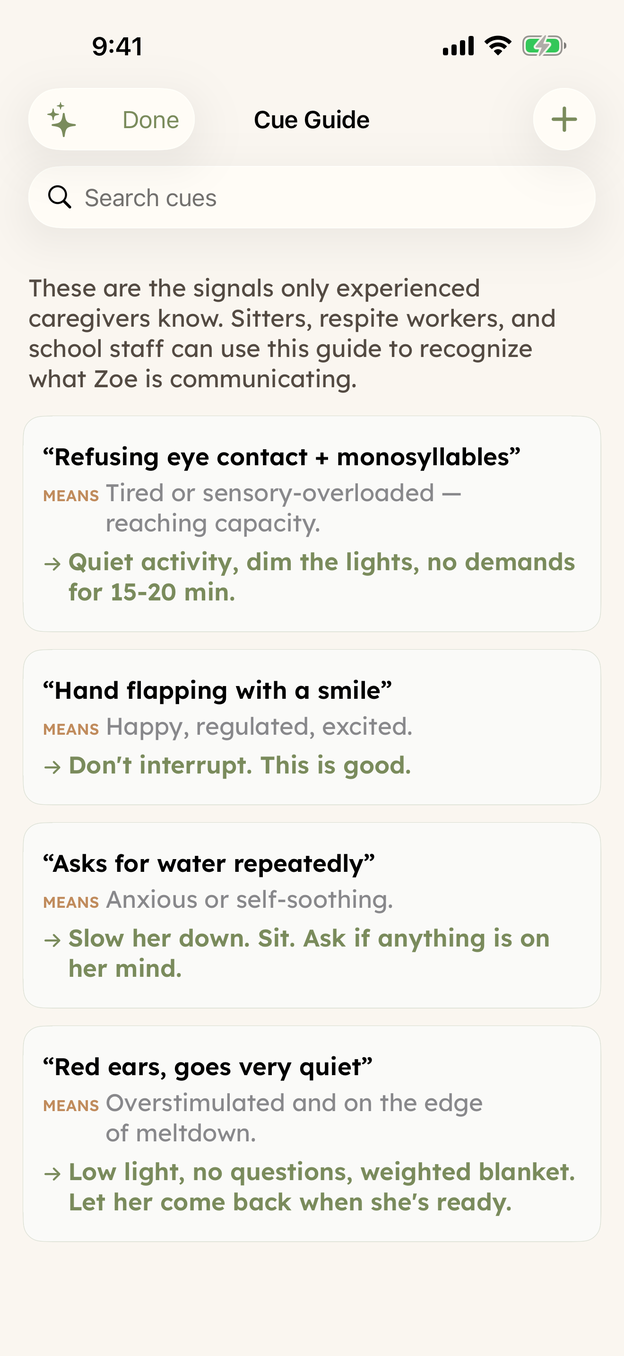
The Cue Guide on demo data. Tap the + at the top right — or, on an empty guide, tap Add a cue — to start one of your own. -
Each card holds the three lines: the cue in bold, what it means labeled MEANS, and exactly what to do in green with an arrow.
You don't need ten entries for this to help. Start with the one cue that prevents your worst outcome, then add the next most important one after that. A guide with one accurate entry a new aide actually reads is worth more than a guide with fifteen they skim past on their way out the door.
Getting it to the new person
Writing the guide is half of it. Getting it in front of someone who's never opened CareHaven before they're alone with your child is the other half, and the Cue Guide doesn't have to be shared on its own — it rides along inside a Handoff.
- Tap Main Menu → Team → Handoff.
- Choose a time window — the last 24, 48, or 72 hours — so the snapshot covers the right stretch of days.
- Pick the aide from your contacts, and add a line or two under the "tell them" notes if there's something specific for tonight.
- Tap Send handoff. If the aide has CareHaven open nearby, it offers to send straight to their phone; otherwise it opens your regular share sheet, so you can text or email it the way you'd send anything else. A QR code and a printable PDF are both there too, for someone who would rather have paper in hand.
The handoff's CUES section carries your saved cues in automatically — you write them once, in the Cue Guide, and they show up in every handoff after that without retyping a word.
Start with one
You won't finish this in one sitting, and you don't need to tonight. Open the Cue Guide, write the single cue that would have mattered most the last time a new person was in charge, and save it. That one entry — red ears, quiet space, five minutes — can be the difference between a hard afternoon and a manageable one, for someone who's never met your kid and is doing their best with exactly what you gave them.
CareHaven is in open beta
Everything above is in the app. It is free while in beta, all your care data stays on your device, and you can walk away with a full backup at any time.
Join the iPhone beta →