
Your mother is coming Saturday afternoon to watch the kids. The new aide starts Monday. Your ex has him for the first overnight in months. In the days before any of those, the instinct is the same: write it all down. Every medication, every provider, every food rule, every small routine you worked out over months of trial and error — get it all into one document before they walk in the door.
It doesn't work. Handed a packet that covers everything, a new co-caregiver reads the first page and skims the rest, because nothing on it is marked as more important than anything else. A meta-analysis of nursing shift-handoff studies found the same failure in a very different setting: loading a handoff with information that isn't essential doesn't just waste time, it obscures the details that actually matter, and missing something important was the single most common error type across the studies reviewed (BMC Nursing, 2026). A living room isn't a hospital ward, but the mechanism travels: more information on the page doesn't mean more gets through. Past a certain point, it means less does.
I learned this with my own son, the slow way. For years, most of what he actually needed lived entirely in my wife's head. The only reason I found out was that every time someone else stepped in to watch him — a sitter, a grandparent, a substitute teacher — she had to say the contents of her head out loud, in real time, and half of it still didn't make it across.
Figure out what day one actually needs
The fix starts with a narrower question. Instead of asking what someone needs to know about him in general, ask what this specific person needs to know for this specific afternoon. Those are different lists, and the gap between them is most of the problem.
What belongs on day one: what's happening today, roughly in order, with times. What to do if the plan changes — a refusal, a meltdown, a missed nap. Who to call, and in what order. What can wait: the full evaluation history, the insurance thread, six months of behavior notes, every provider he's ever seen. That's real information and it matters. It just doesn't matter at 3:00 on a Tuesday, to someone who's there for three hours.
A practical way to build that narrow slice: open your own calendar or to-do list for the day they're covering, and copy out only what falls inside their shift — just the hours they're actually there, not the week or the diagnosis list. For a Saturday-afternoon grandparent, that might be three lines: lunch at noon, a nap by one, no screens after four. For an overnight aide, it's the evening routine and what "something's wrong" looks like for this particular kid. Everything else can wait for the second visit, or the fifth.
Most caregivers are already doing this with someone
This situation is more common than it feels in the moment. A study of caregivers of older adults found that nearly nine in ten were already sharing the work with a medical professional, another family caregiver, or a paid caregiver — hardly anyone was doing it entirely alone. But the same study found that caregivers rated their coordination with those other family and paid caregivers as only moderate, not good (JAMA Network Open, 2025). The study doesn't say why coordination stalls at moderate instead of good. My guess, from the other end of it, is that most of that coordination still happens the hard way — a phone call, a text thread, a conversation rebuilt from memory in the driveway — instead of something either side can actually look at.
How CareHaven narrows the share
CareHaven's answer to this is a per-person, per-section invite, and it's worth walking through once so you know exactly what you're choosing when you send one.
- Open the Main menu (bottom left) and tap Team.
- Tap Shared with — this opens the Profile access screen.
- Tap Invite someone.
- Pick a role for them — Grandparent, for instance. CareHaven sets sensible defaults you can adjust.
- Choose which sections to share. Anything you don't pick stays private.
- Give the invite a name and send it by Messages or Mail.
Nothing is shared until you do this. The invite starts with every section unchecked, and the Send button stays off until you've picked at least one — there's no version of this where a stray tap hands someone your whole history by accident. If you do choose the widest possible access, CareHaven stops you with a Share full access? confirmation first, so the broadest share is never one absent-minded tap away.
What you pick determines what they actually see when they open the app on their own phone. These two screens show the difference.
-
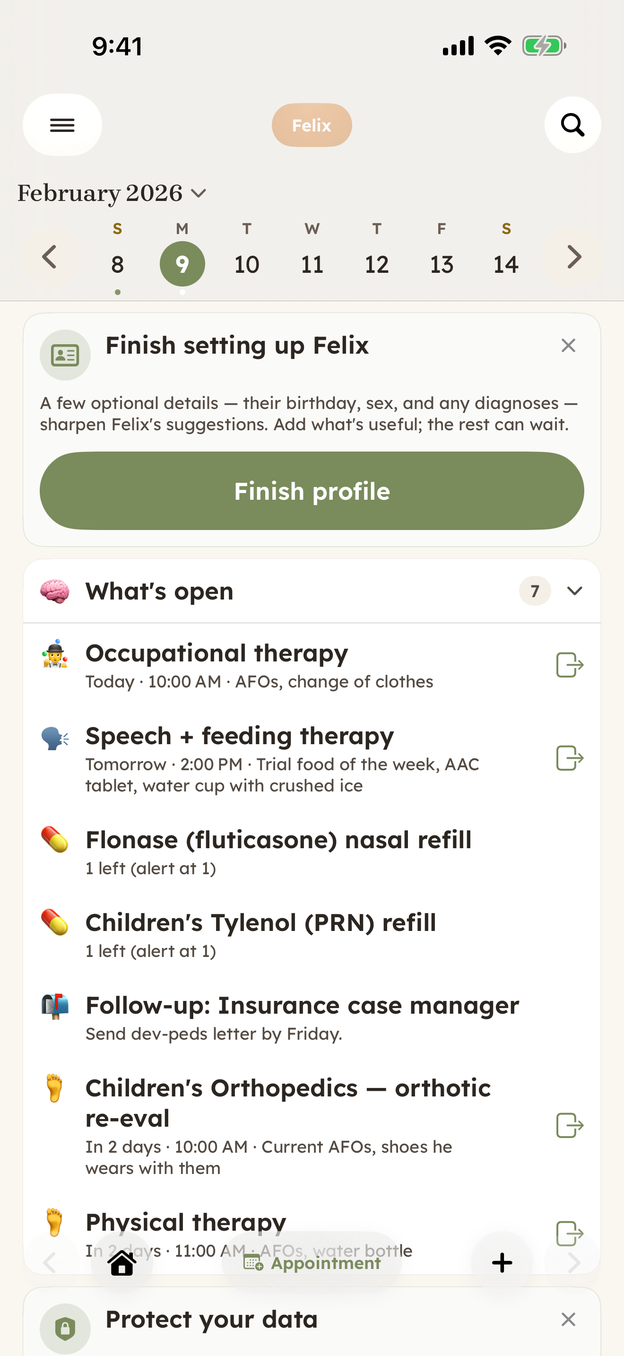
Home: the full running list, current and real — and built for you. -
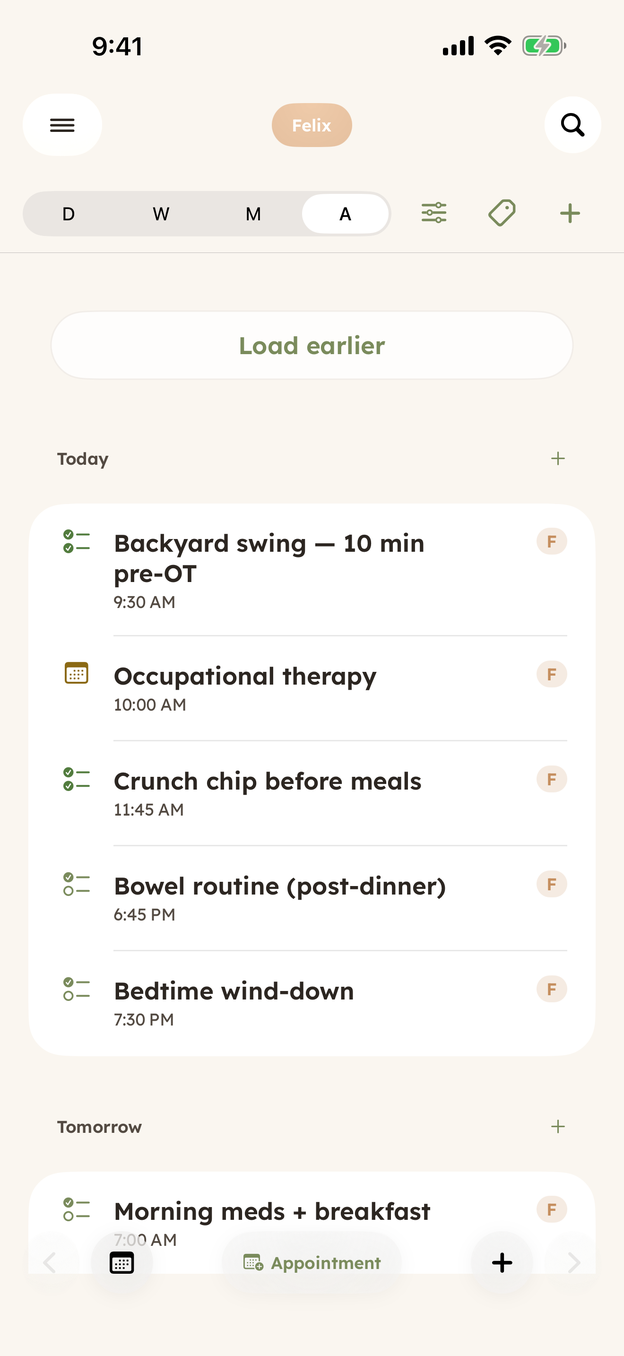
Schedule: just today, in the order it happens.
The Home screen is built for the person carrying the whole picture — appointments, refill alerts, an insurance follow-up, an upcoming eval, all of it current and all of it real. That's the right screen for you. A grandparent watching for an afternoon needs something else entirely. The agenda view strips that down to the one thing that matters for a few hours: what's happening, in order, starting now. If all a co-caregiver needs is to get through a shift, sharing something closer to that agenda is closer to the whole job than handing over the full Home feed ever was.
Start narrow, widen later
You can always add more. Share a couple of sections at first and widen them as the arrangement settles in — the grandparent who's there every other Saturday eventually earns more than the agenda view, and you'll know when that's true because you'll find yourself wishing they already had it. Access is per person, not all-or-nothing, so widening what one co-caregiver sees never touches what anyone else has.
When it stops working — the aide moves on, the arrangement with your ex changes — go back to Shared with, tap their name, and delete. It takes effect right away, and it's scoped to that one person. Everyone else you've shared with keeps working exactly as before.
CareHaven is in open beta
Everything above is in the app. It is free while in beta, all your care data stays on your device, and you can walk away with a full backup at any time.
Join the iPhone beta →