A calmer way to track cues, goals, and handoffs
The cues, the routines, the IEP data, the "here's what a hard moment looks like" — it all lives in your head. CareHaven gives it one private, on-device home, so a rough day is easier to see coming and easier to hand off.
Carrying all of that is called the mental load — read our guide to what it is and what actually helps.
Paid plans start at the App Store launch. The free iPhone open beta is coming soon. Join the beta list and we'll email you when it starts.
The part no one else can see
The signals you learned the hard way don't fit in a ten-minute download at the door. CareHaven gives them somewhere to live.
"You can read the early signs of a hard moment — but no one else can, and you can't be everywhere."
The app writes the cues down so the people helping can catch them sooner too.
"The meeting is next week and the data is scattered across a notebook, your phone, and your memory."
The app tracks each goal from baseline toward target, so progress is already pulled together.
"Every sitter, grandparent, or sub gets the same rushed, ten-minute download at the door."
The app builds the sheet — today's plan, the cues, and what to do, ready to hand off.
"You track what's working across weeks, but it's hard to actually see the pattern."
The app reads your own log back — mood by hour, how sleep tracks with harder days.
One private home for all of it
Every feature maps to something the app actually does — no clutter, no accounts.
Log the cue in two taps, not two paragraphs
Note a regulation shift, a rough moment, or a sleep change right when it happens, and it lands on one scrollable day. The signals you learned the hard way get written down instead of carried around — so the pattern is there when you need it.
Walk into the IEP meeting with the data already pulled
Track each goal and therapy target from baseline toward target over months, so progress is something you can show, not something you have to reconstruct the night before the meeting.
The sensory map travels with the handoff
Build an 8-channel sensory profile once — what soothes, what overwhelms, what to avoid — and it rides along in the handoff sheet so a sitter or sub starts the day already knowing.
Hand off to a sitter with nothing to install
NameDrop a time-boxed brief straight to a sitter's iPhone — the essentials, no app download, no account. When the window's up, it's gone.
The moment it leaves your head
The first time you AirDrop a handoff sheet with the sensory profile baked in — and the sitter texts back "got it, we're good" instead of calling with a question — you feel the mental load actually leave your head and land somewhere safe.
Private by design
On-device by default. No resale, no account for the core app — your family's information stays on your iPhone unless you choose otherwise.
On-device by default
No CareHaven account, and nothing CareHaven runs can read your log. It lives on your iPhone unless you choose otherwise.
Sync only if you turn it on
Optional encrypted iCloud sync (Apple CloudKit) — only if you want it across devices. Nothing leaves your device unless you choose it.
In the app: no resale, no tracking
CareHaven doesn't sell or share your care data and doesn't track it. Lock the app behind Face ID or a PIN if you like.
Simple pricing, when it's time
Paid plans start at the App Store launch. The free iPhone open beta is coming soon. See how the plans will work on the main pricing page.
Questions families ask
Is CareHaven on the App Store yet?
Where does my family's information live?
Can I track IEP and therapy goals in it?
Do the people helping me need to install anything?
See what the app actually shows
The free Sensory & Cue Handoff is the print version of these screens — the app builds them and keeps them current for you.
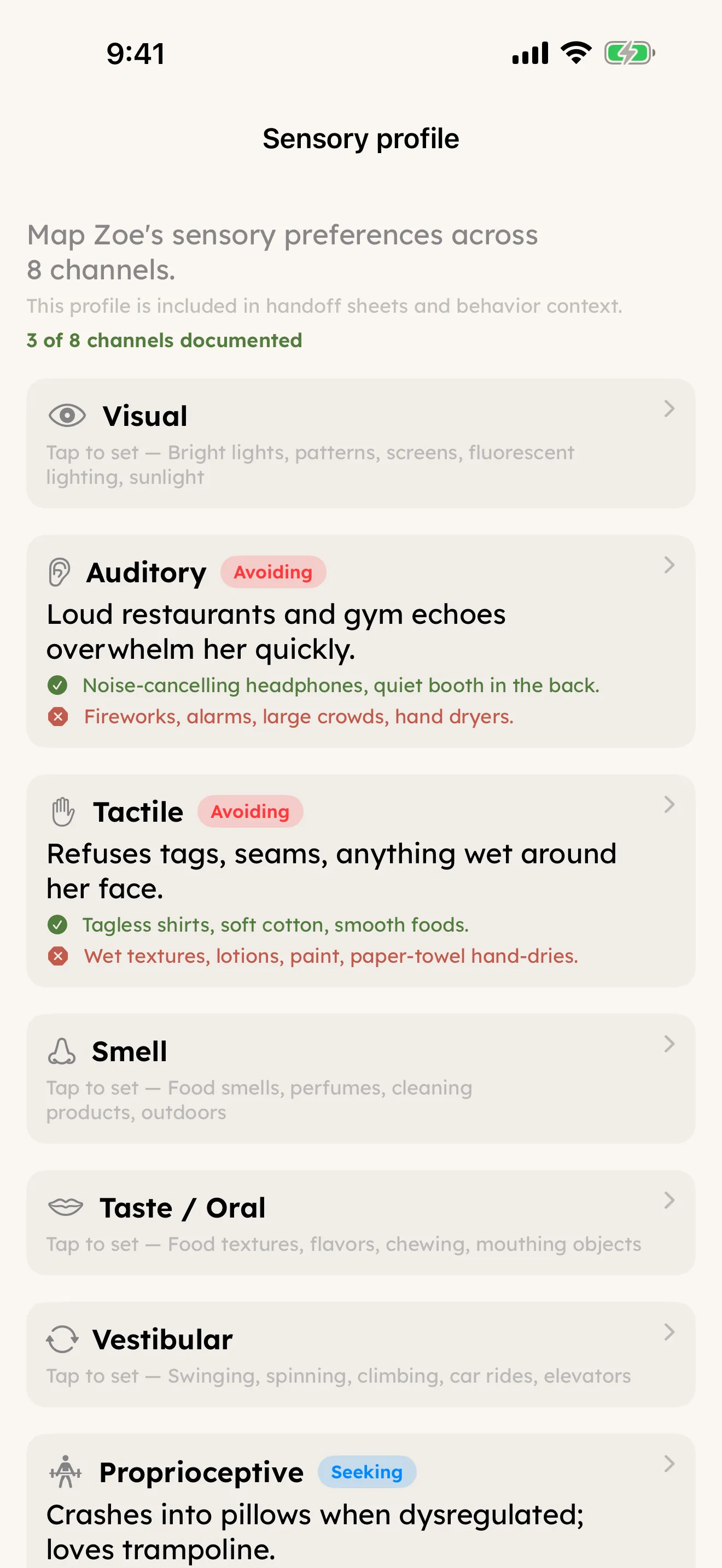
Sensory Profile — eight channels: what calms, what overwhelms, what to avoid.
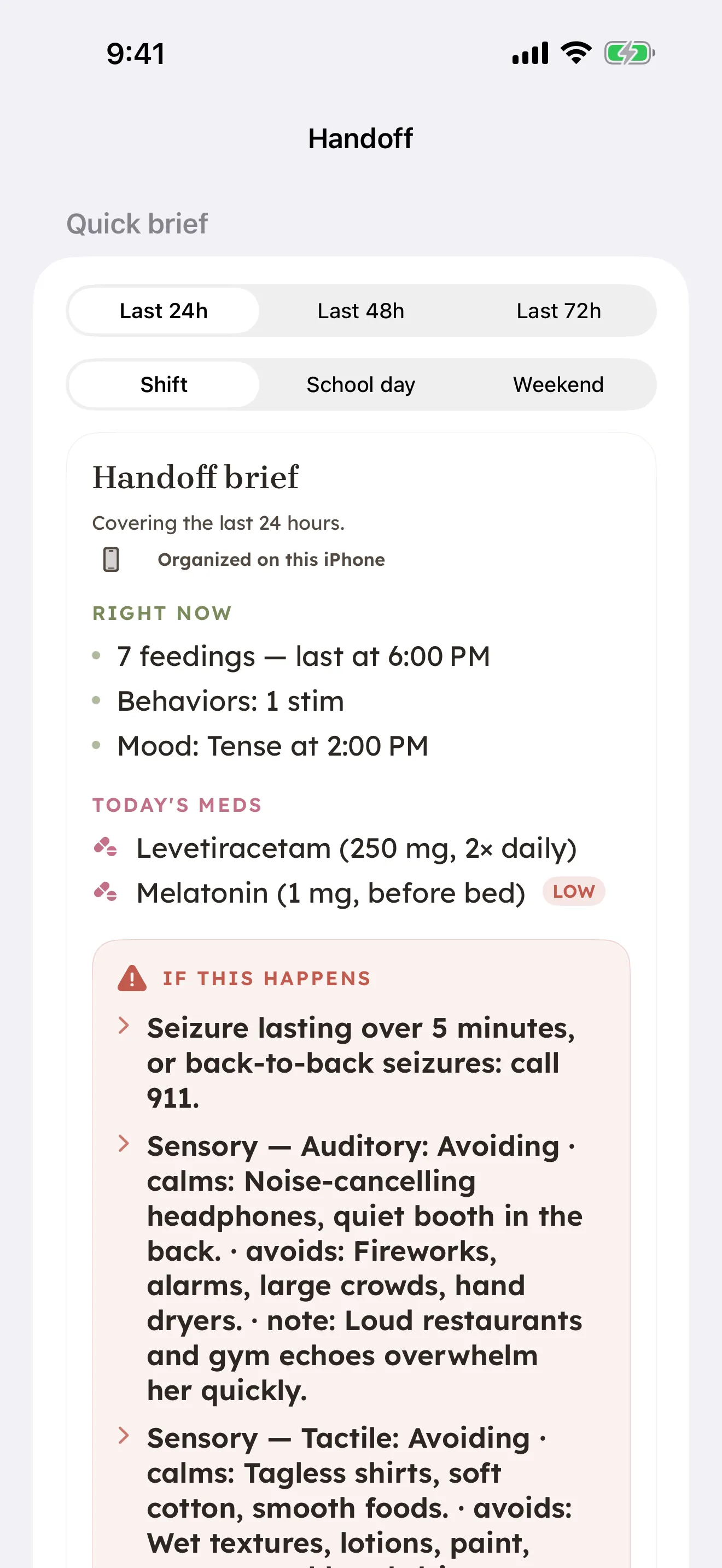
Handoff — today's brief with cues, meds, and what to do, ready for a sitter.
One page anyone can follow
A one-page Sensory & Cue Handoff template for what to leave with a sitter, grandparent, or sub — today's plan, the sensory triggers and early cues to watch for, and what to do. It's the print version of what the app builds and keeps current for you.
More for your situation
CareHaven carries the mental load across a lot of caregiving situations. Find the one closest to yours.