Readings, meds, and appointments — in one calm place
Daily-management conditions like Type 1 diabetes and asthma turn every day into a running log — the numbers, the doses, the "was that better or worse than yesterday." CareHaven gives all of it one private, on-device home, so the patterns are easier to see and every appointment starts prepared.
Running that log in your head has a name — read our guide to the mental load of caregiving.
Paid plans start at the App Store launch. The free iPhone open beta is coming soon. Join the beta list and we'll email you when it starts.
The daily load you're already carrying
Type 1 diabetes, asthma, and conditions like them ask for something every single day. CareHaven is built to hold that.
The blood-sugar readings, the carbs, the doses — scattered across a meter, an app, and your memory.
You can never quite see the whole day at once.
The app puts every reading, dose, and note on one scrollable day.
The inhaler at 7, the controller med at night, the "did I already give that?"
A missed or doubled dose is one distraction away.
The app tracks each medication on its own schedule, so nothing slips.
The endocrinology and pulmonology visits where you rebuild weeks from memory.
The pattern that mattered is the one you forget to mention.
The app turns 30 days into a doctor-ready summary with one tap.
Everything you track every day — written down, in order, ready to hand off
Each of these maps to something the app actually does today. No holding the whole routine in your head.
One day, one timeline you can actually read
Readings, doses, meals, symptoms, and notes all land on a single scrollable day. Over time the shape of it comes into focus — the mornings that run high, the nights that lead to a rough next day — so the patterns come to you instead of living in your head.
Log a reading in seconds
Capture a blood-sugar number, a peak-flow reading, a temperature, or any vital in a couple of taps, and watch the trend build over days and weeks. The quick entry keeps up with a condition that asks for a number several times a day.
Every medication, tracked — with the right question flagged
Build the medication list from a real drug library, log doses on their own schedules — insulin, inhalers, controllers — and get a flag when a new medication falls into a drug class with a well-known caution against one already on the list. It doesn't diagnose interactions and won't catch everything — it gives you a specific question to put to the prescriber or pharmacist.
Walk into every appointment prepared
Keep every endocrinology, pulmonology, and follow-up appointment in one place, and when it's time, one tap pulls the last 30 days — readings, doses, symptoms, vitals — into a clean, clinician-ready summary. Walk in with the full picture instead of scrambling to remember it.
One page for whoever takes over next
Generate a one-page Handoff Sheet — today's plan, the warning signs to watch for, the medications, and emergency context — to AirDrop, print, or share with a school nurse, a coach, a sitter, or the other parent. Or NameDrop a time-boxed brief with nothing to install on their end.
You stop being the meter, the memory, and the messenger
The moment it clicks: you hand the school nurse a one-page sheet with the routine, the warning signs, and the emergency plan already written down — and the day runs without a single "quick question" text. Then, weeks later, you tap once before the appointment and the whole month is already summarized for the doctor. The running log finally lives somewhere other than your head.
Private by design
Your family's care lives on your device by default — no CareHaven account, and nothing CareHaven runs can read your care log. If you want it across devices, you can turn on optional encrypted iCloud sync (Apple CloudKit); nothing leaves your phone unless you choose it.
On-device by default
No CareHaven account, and nothing CareHaven runs can read your care log. You can lock the app behind Face ID or a PIN, and only turn on optional encrypted iCloud sync (Apple CloudKit) if you want it.
In the app: no resale, no tracking
We never sell your family's care information, and we never use it to target ads. There's nothing to monetize about your health information.
Optional encrypted sync
Want it on more than one device, or shared with the other parent? Turn on optional encrypted iCloud sync (Apple CloudKit) — only if you choose to. Otherwise it simply stays put.
Simple pricing when it's time
Paid plans start at the App Store launch. The free iPhone open beta is coming soon. The full plan details live on the homepage.
See pricingQuestions families ask
Is CareHaven available on the App Store yet?
Not yet. The free iPhone open beta is coming soon. Join the beta list and we'll email you when it starts. Paid plans start at the App Store launch.
Can I log blood-sugar readings and other daily numbers?
Yes. You can capture a blood-sugar reading, a peak-flow number, a temperature, or any vital in a couple of taps, log the medications alongside them, and see the trend build over days and weeks. Everything lands on one day at a time so the whole picture stays together.
Can it help me spot patterns or triggers?
It surfaces patterns from what you've entered — the times of day, the days that ran harder — so you can bring what you see to your care team. CareHaven is not a medical device and does not give medical advice; it helps you record and surface patterns, it does not diagnose or advise. Always bring what you notice to your healthcare provider.
Where does my family's information live?
On your device by default — no CareHaven account, and nothing CareHaven runs can read your care log. Nothing leaves your phone unless you explicitly turn on an option like optional encrypted iCloud sync (Apple CloudKit) — and we never sell your family's care information.
Is this a medical device or medical advice?
No. CareHaven is a caregiver tracking and coordination tool. It is not a medical device and does not provide medical advice — it helps you record and surface patterns; it does not diagnose or advise. Always consult your healthcare provider for medical decisions.
See what the app actually shows
The free Daily Pattern Log is the print version of these screens — the app logs and reads them back for you.
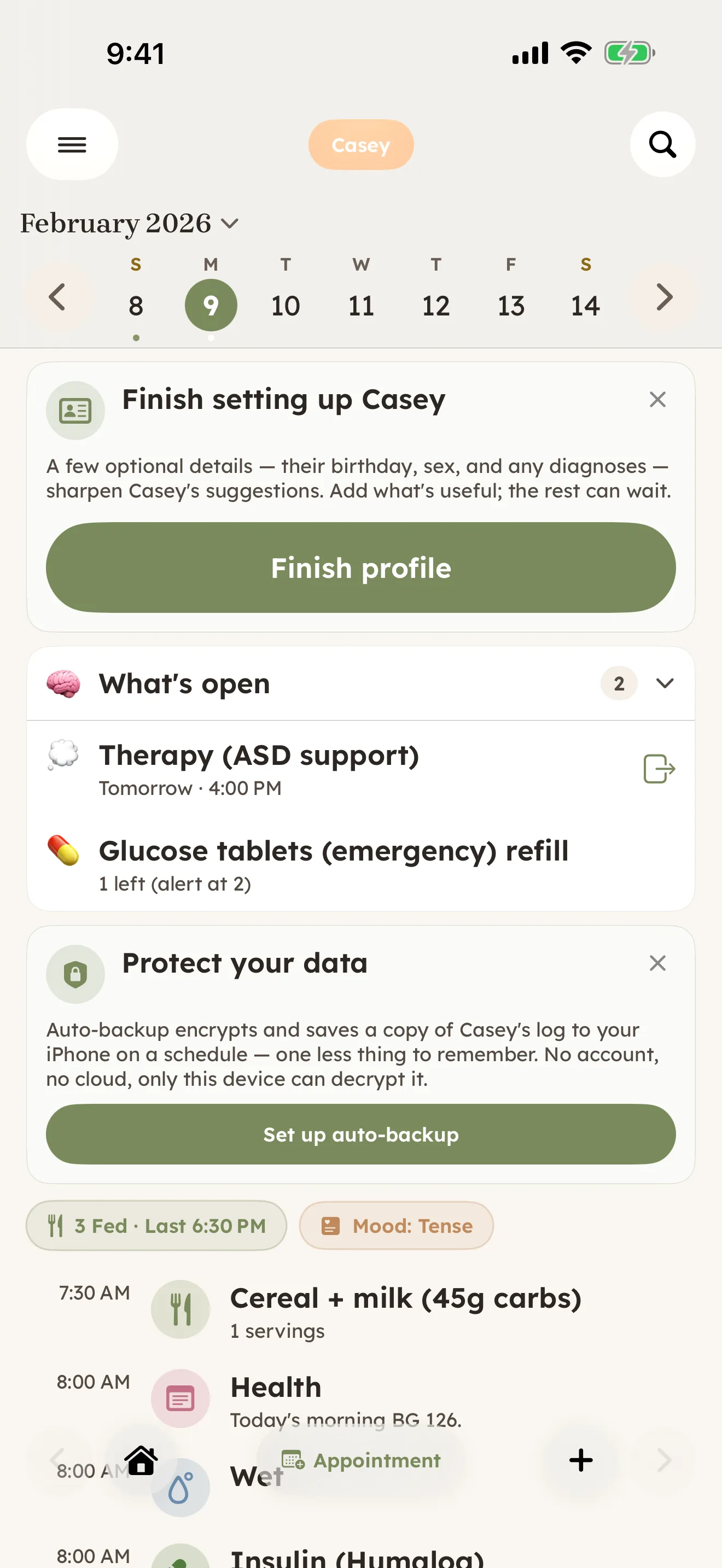
Home — the day at a glance: a CGM sensor change, a glucose-tablet refill, and a therapy session.
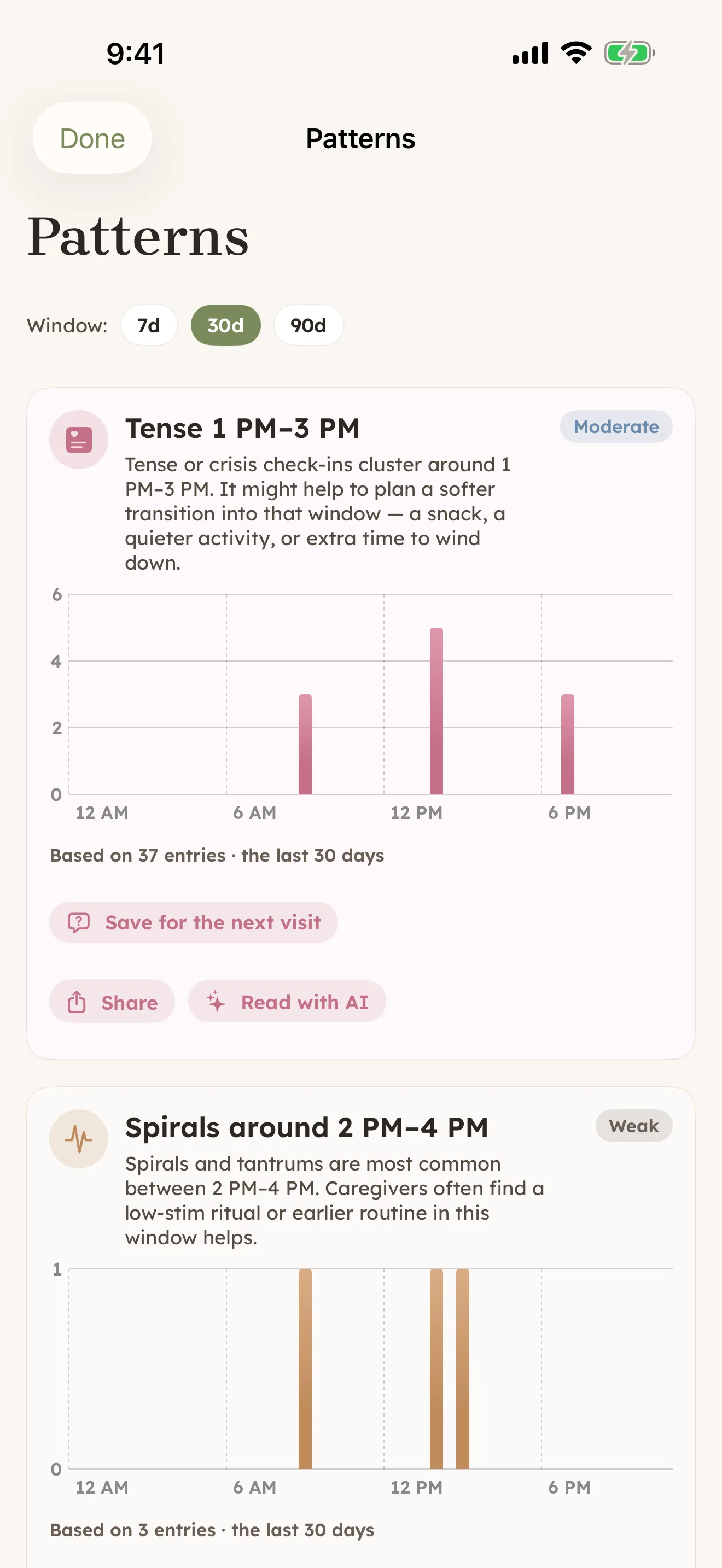
Patterns — the app reads your daily log back as time-of-day trends (not medical advice).
One page to track the daily numbers
A free one-page Daily Pattern Log you can print and fill in — the readings, the doses, the symptoms, and the notes for the day, in one place a school nurse or the other parent can follow. It's a paper companion to the day timeline the app keeps for you.
More for your situation
CareHaven meets different caregiving loads. Here's more for where you are.