Everyone who helps can see what happened today
When more than one person shares the care, the hardest part is staying on the same page. CareHaven gives your household one private place for today's log, the open to-dos, and the handoff — so the last shift and the next one always match. Real-time, everyone-sees-today sync is part of the Family tier at App Store launch.
Splitting the mental load, not just the tasks, is what actually makes shared care work — read our guide to what it is.
Paid plans start at the App Store launch. The free iPhone open beta is coming soon. Add your email and we'll tell you when it starts.
Built for more than one set of hands
Four things a shared-care household needs most: one record everyone reads, one entry everyone sees, a handoff a sitter can trust, and open loops anyone can pick up.
One day, one timeline everyone can read
The Day Timeline is a single scroll of everything that happened — feeds, sleep, behavior, doses, notes. Whoever is on now sees exactly what the last person recorded, so nobody has to reconstruct the day from memory.
When one person logs, everyone sees it
With real-time co-caregiver sync, an entry Mom adds shows up for Dad and Grandma on their own phones — no double-logging, no group-chat relay. Shared, real-time sync is part of the Family tier; paid plans start at the App Store launch, and the free iPhone open beta is coming soon.
A handoff the sitter can trust — no app to install
Hand off in one tap: NameDrop a time-boxed brief to a sitter's iPhone with the App Clip handoff. They get today, the cues, and the emergency info for their shift — no download, no account, and it expires when the shift is over.
Open loops the whole household can pick up
Care to-dos hold the one-off tasks — refill by Friday, call the school back, pack the meds — with due dates and sub-steps, grouped by urgency. The "What's open" digest surfaces the loose ends on the home screen, so whoever tags in next starts with the same clear picture instead of a cold start.
The handoff you don't have to remember to have
The moment the second caregiver opens the app and today is already there — the feeds, the last dose, the nap that just ended — without a single text being sent. The handoff stops being a conversation you have to remember to have, and becomes something the household just shares.
You choose what to share
On-device by default, and no resale of your family's data. Sharing uses iCloud. Apple encrypts synced records while they travel and while they are stored in iCloud. You choose which caregivers to invite and which sections to share.
On-device by default
There is no CareHaven account. Your household's care record lives on your phones, and nothing CareHaven runs can read it.
Encrypted sharing, only when you turn it on
Family adds sharing with caregivers you invite. You choose which sections to share. Apple encrypts synced records while they travel and while they are stored in iCloud.
In the app: no resale, no tracking.
We don't sell your family's data, run ads against it, or track your care activity. Apple may receive crash and performance diagnostics according to your diagnostic-sharing settings.
Simple pricing when it's time
Paid plans start at the App Store launch. The free iPhone open beta is coming soon. Shared real-time sync and family coordination live on the Family tier — see how it all lines up on the pricing page.
Questions from shared-care households
Can more than one person use the same care record?
Yes. Care Circle lets you invite the people who help and give each the right level of access, and real-time co-caregiver sync means an entry one person logs shows up for the others. Shared, real-time sync is part of the Family tier; paid plans start at the App Store launch, and the free iPhone open beta is coming soon.
Does the sitter or grandparent need to install anything?
No. The App Clip handoff lets you NameDrop a time-boxed brief to a sitter's iPhone with no download and no account — they see today, the cues, and the emergency info for their shift, and it expires afterward. There's also the one-page Handoff Sheet you can AirDrop or print.
Is our family's information private if we're sharing it?
Yes. CareHaven is on-device by default. You choose which caregivers to invite and which sections to share. Apple encrypts synced records while they travel and while they are stored in iCloud. We never sell your family's care information.
See what the app actually shows
The free Shared-Care Briefing is the print version of these screens — the app keeps everyone helping on the same page.
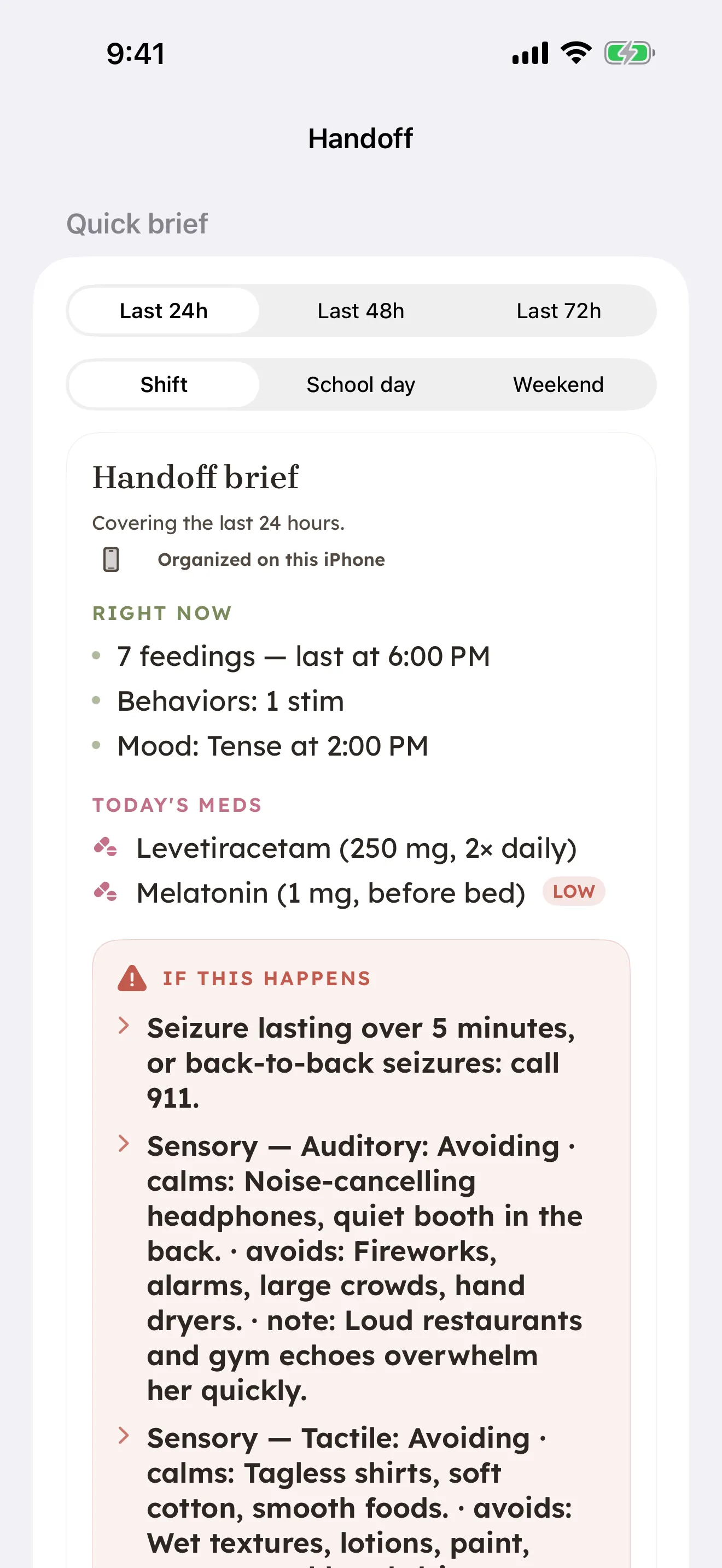
Handoff — the same briefing everyone helping can follow, always current.
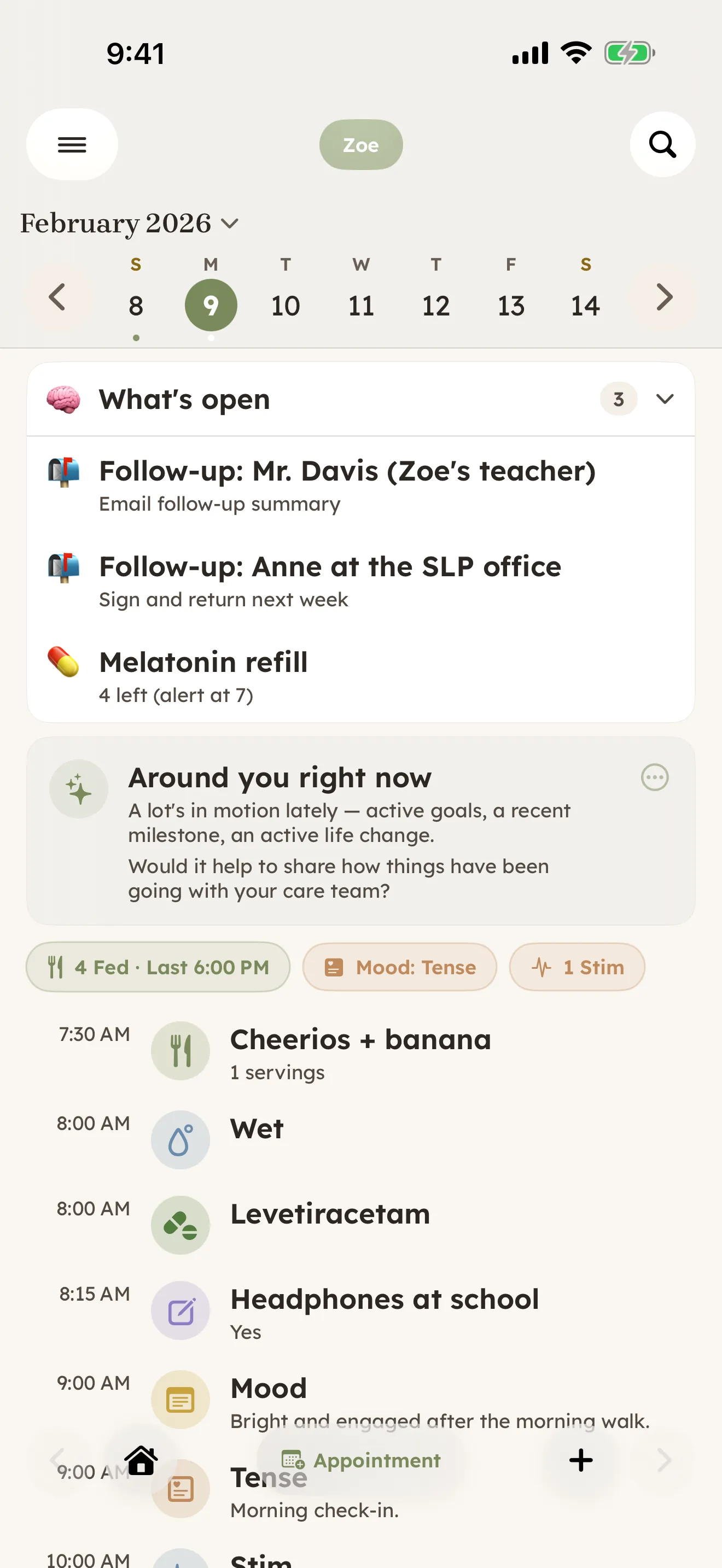
Home — one day at a glance: What's open, a refill alert, and the day's entries.
The one page every helper needs
Before you hand off to a partner, a grandparent, or a sitter, fill in the free Shared-Care Briefing — today, the cues, and the emergency info on one printable page anyone can follow. It's the print version of what the app keeps in sync automatically — real-time, everyone-sees-today sync is part of the Family tier at App Store launch. The free iPhone open beta is coming soon.